Identity based attacks are no longer theoretical. AiTM phishing campaigns, token theft and adversary in the middle proxies have fundamentally changed Conditional Access design. Detection without enforced recovery is insufficient. Modern identity protection must focus on immediate containment and deterministic remediation.
Microsoft recently introduced a new grant control in Conditional Access called Require risk remediation. This control changes how organizations can respond to detected user risk.
This article explains what it does, how it differs from traditional risky user policies, and why it matters in modern attack scenarios.
- How risk was handled previously
- What Require risk remediation does
- How remediation differs between authentication methods
- What Microsoft states about this control
- Why this matters in modern attack scenarios
- Impact on Conditional Access design
- Important considerations before enabling
- Final thoughts
- References
Licensing requirement
Require risk remediation relies on Microsoft Entra ID Protection capabilities and therefore requires Microsoft Entra ID P2 licensing for the users in scope.
The Microsoft managed remediation policy cannot function without Entra ID P2 because user risk evaluation and automated remediation flows are part of Identity Protection.
How risk was handled previously
Historically, Microsoft Entra ID Protection also provided its own built in risk policies, separate from Conditional Access. These Identity Protection policies allowed administrators to configure risky user and risky sign in responses directly within the Identity Protection blade.
However, these legacy Identity Protection risk policies are being retired on October 1st this year. Moving risk based enforcement fully into Conditional Access is therefore no longer optional. It is a required architectural transition for organizations that rely on user risk and sign in risk controls.
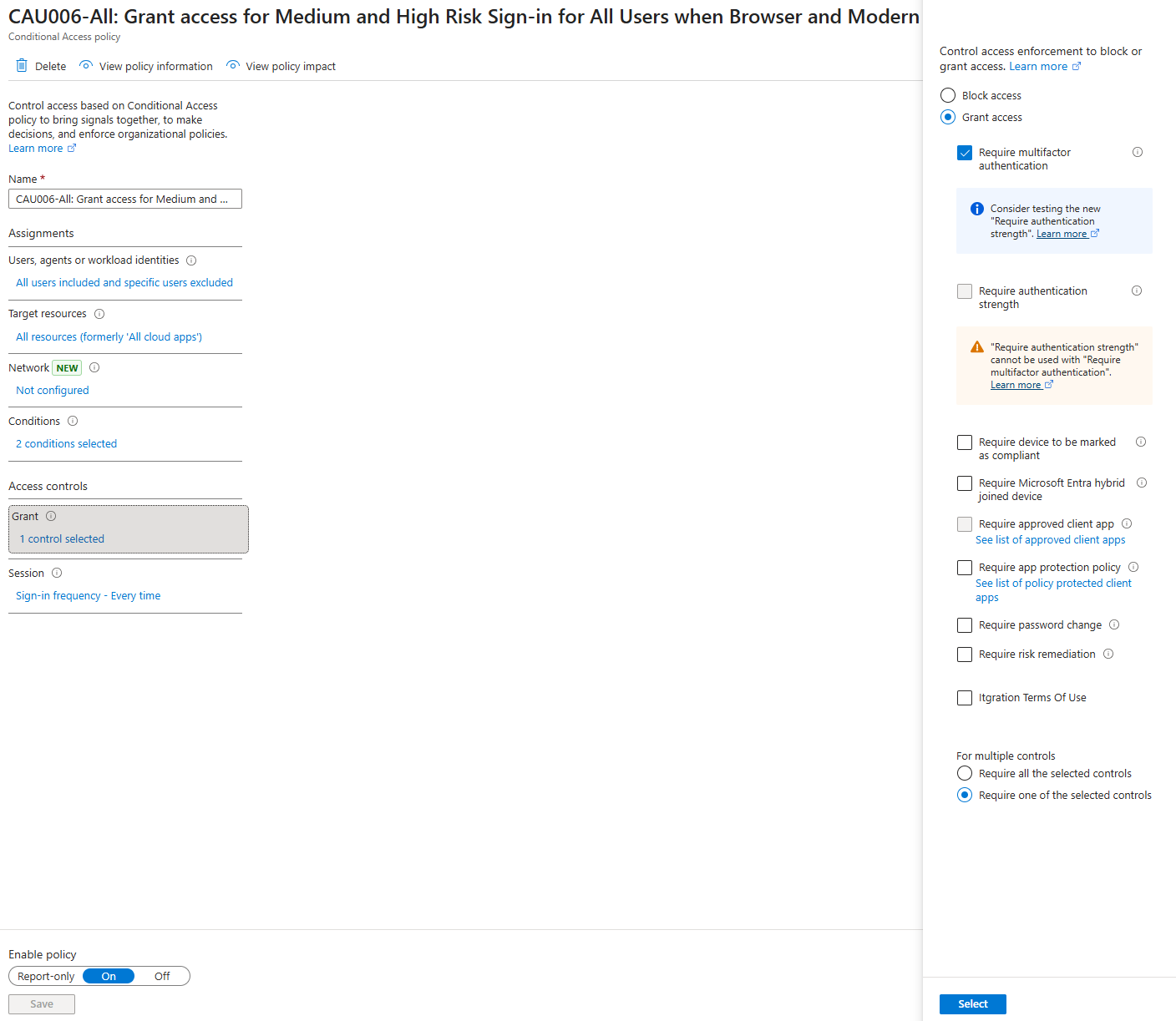
In many environments the configuration typically looked like this:
- Risky sign in policy for all users
Grant control: Require MFA - Risky user policy for internal users only
Grant control: Require password change
Guest users excluded, since risk is coming from their home tenant which without license cannot be remediated.
When AiTM phishing attacks increased, additional controls were often added:
- Block access when user risk or sign in risk is high
While this approach works, it has limitations:
- MFA does not always remediate user risk
- Password change assumes password based authentication
- Passwordless users are not handled consistently
- Blocking increases helpdesk pressure
- Remediation flows differ depending on authentication method
The result is often operational overhead and inconsistent behavior across identity types.
What Require risk remediation does
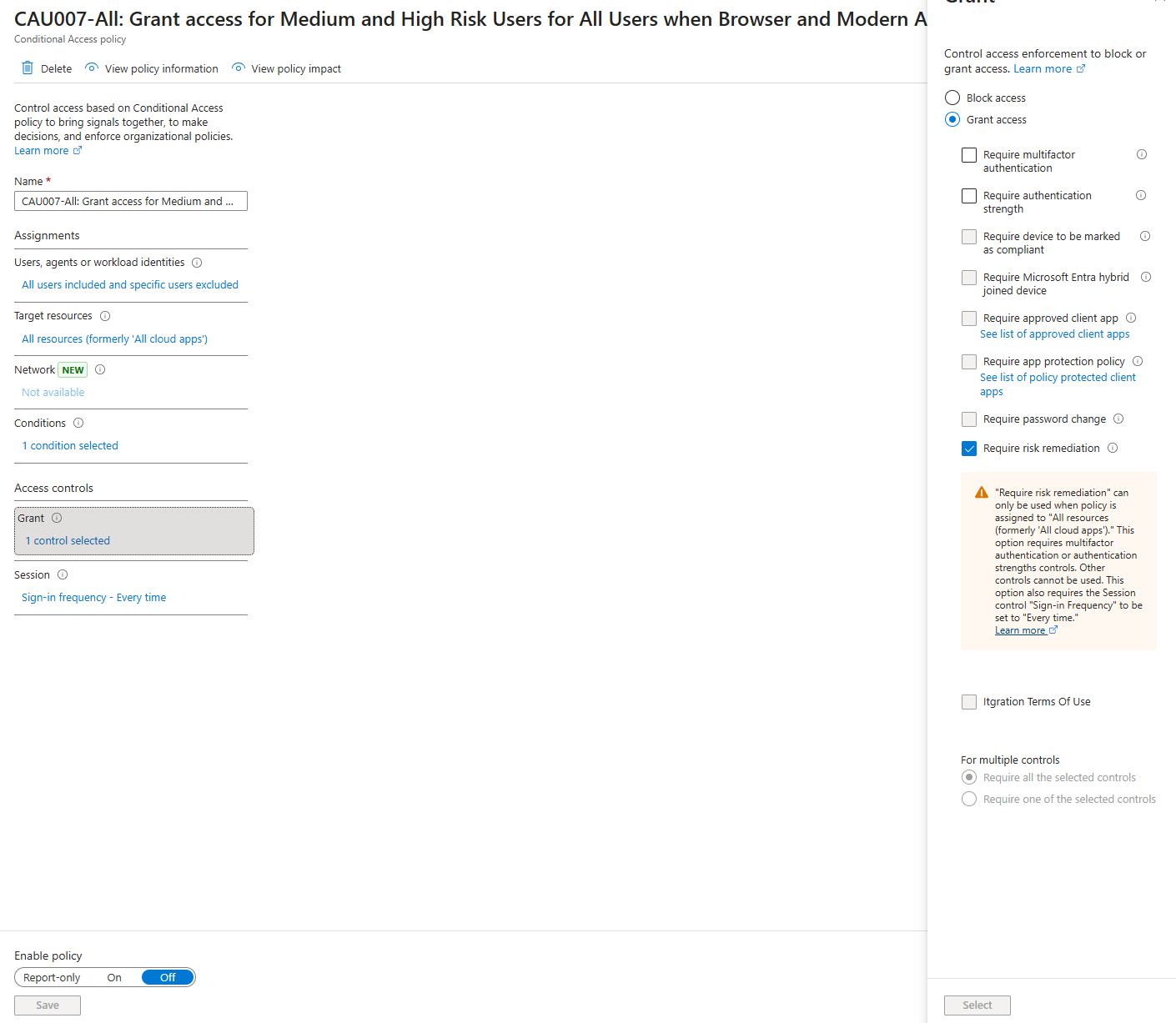
Microsoft Entra ID Protection manages the appropriate remediation flow based on the threat observed and the user’s authentication method. Unlike legacy risky user policies where administrators explicitly configured password change or MFA requirements, the remediation logic is dynamically selected by the platform based on the detected risk and the authentication model in use.
The new Require risk remediation grant control introduces Microsoft managed remediation logic.
It is important to explicitly understand that this control remediates user risk, not sign in risk. If a policy is configured to evaluate sign in risk, this grant control does not clear that signal. It is designed to resolve risk associated with the user object, as determined by Microsoft Entra ID Protection.
When user risk is detected:
- The user must immediately remediate
- The current session is revoked
- The user is forced to sign in again
- Risk is cleared after successful re authentication
When this grant control is selected, Conditional Access automatically applies:
- Require authentication strength
- Sign in frequency set to Every time
These settings are enforced automatically for two important reasons:
- Users must be prompted to reauthenticate after their sessions are revoked. Without Sign in frequency set to Every time, a previously issued token could otherwise still satisfy session requirements.
- Requiring authentication strength ensures that both password based and passwordless users are properly covered by the remediation policy. This guarantees consistent enforcement across authentication models.
If a user has just signed in and risk is detected afterwards, they are prompted again immediately. There is no waiting period. No grace window.
Remediation becomes immediate and deterministic.
How remediation differs between authentication methods
Password authentication
Risky user has an active risk detection, such as a leaked credential, password spray, or session history involving a compromised password. The user is prompted to perform a secure password change and when completed, their previous sessions are revoked.
Passwordless authentication
Risky user has an active risk detection, but it does not involve a compromised password. Possible risk detections include anomalous token, impossible travel, or unfamiliar sign in properties. The user’s sessions are revoked and they are prompted to sign in again.
What Microsoft states about this control
Microsoft describes this feature as a Microsoft managed remediation policy that accommodates all authentication methods, including password based and passwordless authentication.
When a user is required to remediate risk:
- Sessions are revoked
- Authentication strength is enforced
- Sign in frequency is set to Every time
- The user must successfully authenticate again
Only after successful re authentication is the user risk considered remediated.
This ensures that remediation is authentication driven and consistent across authentication models.
Why this matters in modern attack scenarios
Modern phishing attacks such as AiTM do not just steal credentials. They capture session tokens. If a session remains valid after risk detection, attackers can continue operating.
Require risk remediation addresses this by:
- Revoking active sessions
- Forcing immediate re authentication
- Enforcing authentication strength
- Clearing risk only after successful verification
This disrupts token replay scenarios and reduces the window of opportunity for attackers.
It closes a gap where risk detection alone was not sufficient to invalidate active sessions.
Impact on Conditional Access design
With this new control available, Conditional Access design can be simplified and standardized. Instead of layering compensating controls over time, organizations can align risk response with a clear remediation first, block when necessary model.
Instead of combining:
- Risky sign in requiring MFA
- Risky user requiring password change
- High risk requiring block
Organizations can move toward:
- Risk detection requiring risk remediation
- Confirmed or extreme risk requiring block
This separates remediation from outright denial and reduces dependency on password based recovery flows.
For organizations adopting passwordless authentication as part of a Zero Trust or baseline driven security strategy, this is particularly important. Remediation is no longer tied to legacy password constructs but to authentication strength and session control.
Important considerations before enabling
Before implementing Require risk remediation:
- Review authentication strength configuration
- Understand the impact of forced re authentication
- Validate user communication strategy
- Test in Report only mode
- Monitor Identity Protection reporting after rollout
Although powerful, this control changes user experience and session behavior. Controlled rollout is recommended.
Additional platform considerations:
- If a user is assigned to both a policy with Require risk remediation and another policy that enforces Require password change or Block, a conflict can occur. This may result in the user being forced through multiple remediation paths or being blocked entirely. Ensure each user is targeted by only one such remediation policy at a time.
- The Require risk remediation setting remediates user risk only. It does not remediate sign in risk.
- Risky Workload ID is not supported by this grant control.
- External and guest users must continue to self remediate through secure password reset. Microsoft Entra ID does not support session revocation for external and guest users because their risk originates in their home tenant.
- The Require risk remediation grant control is available in Azure for US Government environments.
Final thoughts
Require risk remediation represents a structural shift from reactive blocking toward controlled, platform driven self remediation.
In a landscape dominated by AiTM phishing and token replay attacks, session invalidation and enforced re authentication are essential security measures.
If your current risky user strategy still revolves primarily around password change and MFA enforcement, this new grant control offers a more consistent and modern alternative.
Security today is not just about detecting risk. It is about how quickly and consistently recovery is enforced across all authentication methods, without introducing unnecessary operational complexity.
From a baseline perspective, Require risk remediation enables a cleaner, more maintainable Conditional Access architecture where remediation logic is centralized, session invalidation is automatic, and passwordless strategies are fully supported.
References
- Require risk remediation grant control
https://learn.microsoft.com/en-us/entra/identity/conditional-access/concept-conditional-access-grant#require-risk-remediation - Require risk remediation with Microsoft managed remediation preview
https://learn.microsoft.com/en-us/entra/id-protection/concept-identity-protection-policies#require-risk-remediation-with-microsoft-managed-remediation-preview