Introduction
Configuring Conditional Access (CA) for guest users can be challenging when you want to strictly limit access to Office 365 and a few essential Microsoft services. Many Entra administrators have encountered scenarios where applying a “block all resources” policy breaks necessary functionality such as managing authentication methods, accepting invitations, or accessing user profile pages. This article explains how to properly configure such policies using the recently visible My Sign-ins app in Conditional Access, along with other required service exclusions.
Update September 2026: Some changed behavior on how Guests access their My Account page
Microsoft seems to have changed the sign-in experience for guest users who want to manage their security information in another tenant.
We recently noticed the following behavior:
A guest user opens My Account from their account icon and is presented with the Microsoft sign-in page.
When they simply enter their email address, they may get:
“You can’t sign in here with a personal account. Use your work or school account instead.”
The workaround is not immediately obvious.
The user needs to:
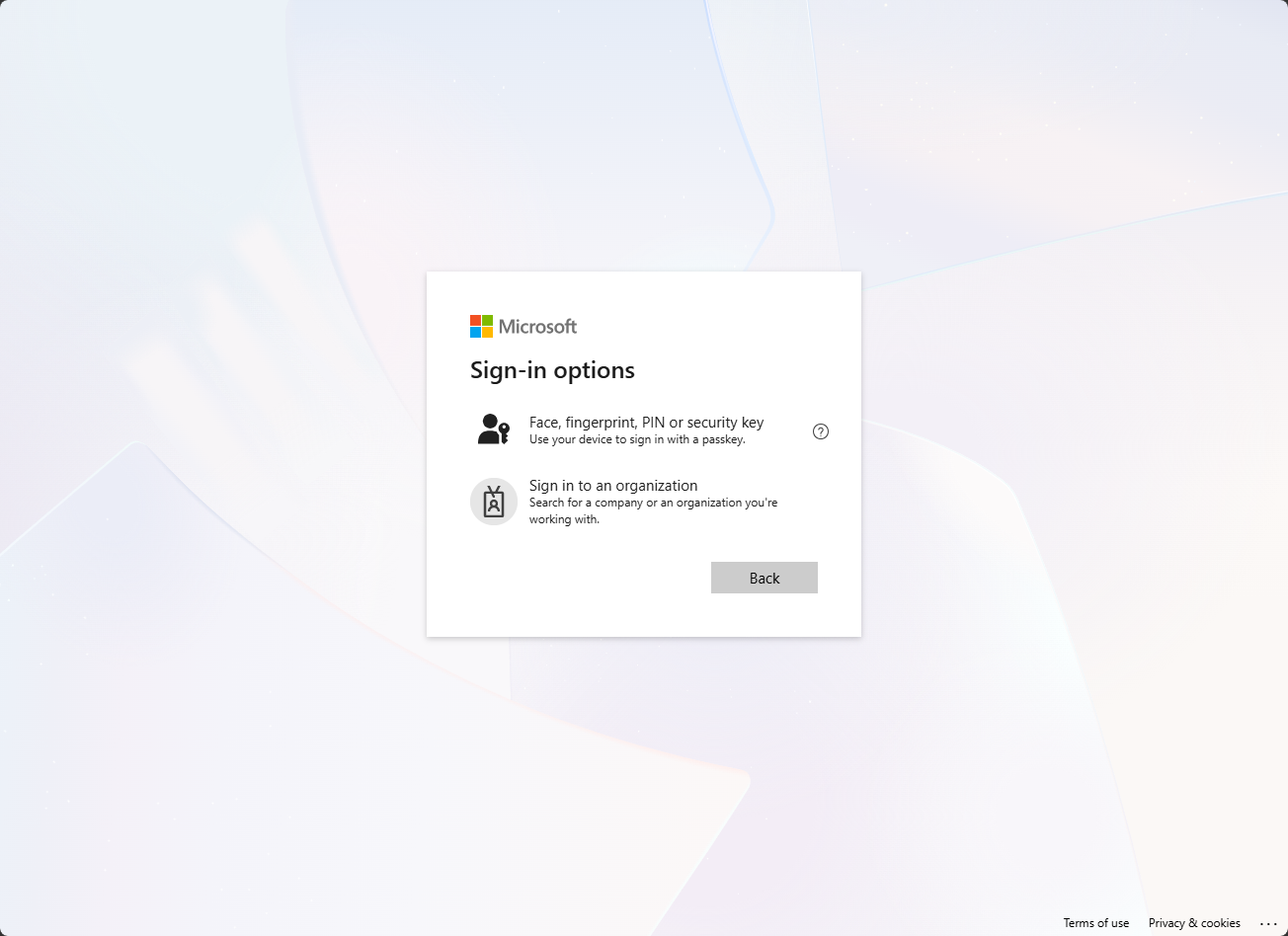
- Select Sign-in options
- Choose Sign in to an organization
- Enter the domain name of the tenant where they are a guest
- Continue authentication
- Open My Account → Security info
After that, the user is placed in the correct resource-tenant context and can access or manage their authentication methods.
This is especially relevant if you require guest users to register MFA or phishing-resistant authentication methods in your tenant.
The important point: this does not necessarily mean the guest account or authentication configuration is broken. In many cases, Microsoft simply doesn’t have the correct tenant context when the user starts from the generic sign-in page.
Definitely something to take into account in user instructions and service-desk documentation.
Background: The “Block All” Conditional Access Approach
When configuring guest access, administrators often rely on a block all cloud resources Conditional Access policy. This approach ensures that guest users cannot access unintended applications or endpoints. However, such a configuration blocks not only user-facing apps but also essential background services and endpoints required for normal operation, including authentication management and sign-in pages.
Previous attempts to selectively allow access using attribute-based filtering in Conditional Access did not yield the expected outcome. While this method could successfully restrict guest users to Office 365 resources, it prevented them from changing authentication methods, for example when a user replaced their mobile device and needed to re-register MFA. The result was an error indicating that “no authentication methods were available.”
The New “My Sign-ins” App Availability
This situation changed when David Nündel highlighted that the My Sign-ins app (AppID: 19db86c3-b2b9-44cc-b339-36da233a3be2) has become selectable in Conditional Access. Microsoft updated its visibility metadata, allowing administrators to include or exclude it directly in CA configurations.
This update provides a long-awaited solution for environments that block all cloud apps but need to preserve user self-service functionality such as MFA management.
Required Exclusions for Functionality
Testing revealed that enabling My Sign-ins alone was not sufficient. Other Conditional Access policies, particularly those requiring MFA for guest access to all cloud apps, continued to block certain dependencies. Microsoft documentation confirms that when an “all cloud apps” policy is configured, exclusions extend beyond the directly selected apps, covering related services such as Graph API and Windows Azure Active Directory.
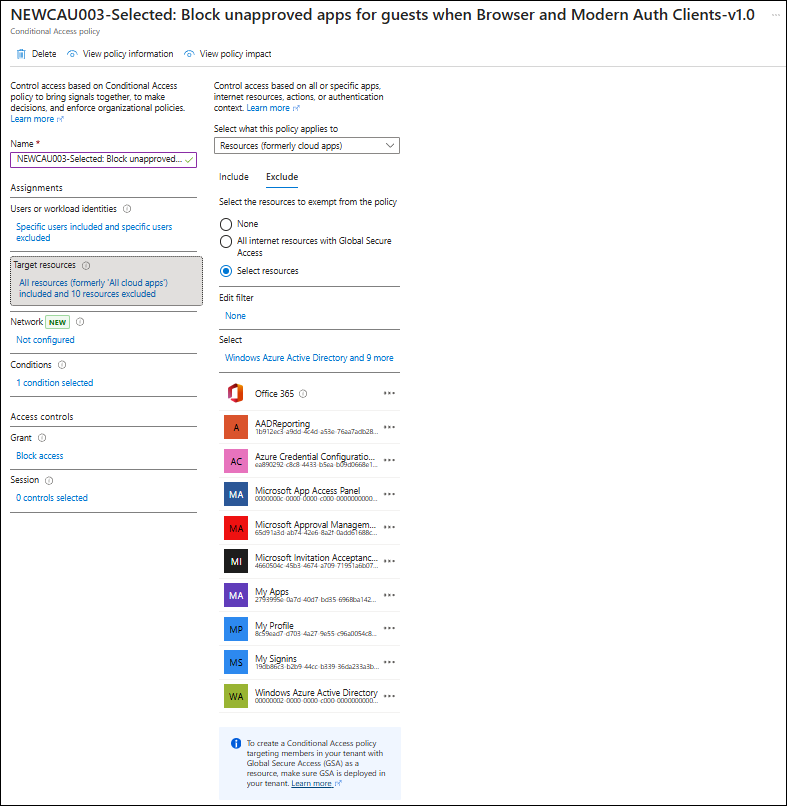
To maintain a functional self-service experience for guest users while upholding security boundaries, the following applications (including their AppIDs) should be excluded from the Block All Cloud Apps Conditional Access policy:
- Office 365 (
00000003-0000-0ff1-ce00-000000000000) - AADReporting (
1b912ec3-a9dd-4c4d-a53e-76aa7adb28d7) - Azure Credential Configuration (
ea890292-c8c8-4433-b5ea-b09d0668e1a6) - Microsoft App Access Panel (
0000000c-0000-0000-c000-000000000000) - Microsoft Approval Management (
65d91a3d-ab74-42e6-8a2f-0add61688c74) - Microsoft Invitation Acceptance Portal (
4660504c-45b3-4674-a709-71951a6b0763) - My Apps (
2793995e-0a7d-40d7-bd35-6968ba142197) - My Profile (
8c59ead7-d703-4a27-9e55-c96a0054c8d2) - My Sign-ins (
19db86c3-b2b9-44cc-b339-36da233a3be2) - Windows Azure Active Directory (
00000002-0000-0000-c000-000000000000)
If any of these apps are not visible in the CA picker, create their Service Principal manually using Microsoft Graph PowerShell:
New-MgServicePrincipal -BodyParameter @{ AppId = "<AppID>" }
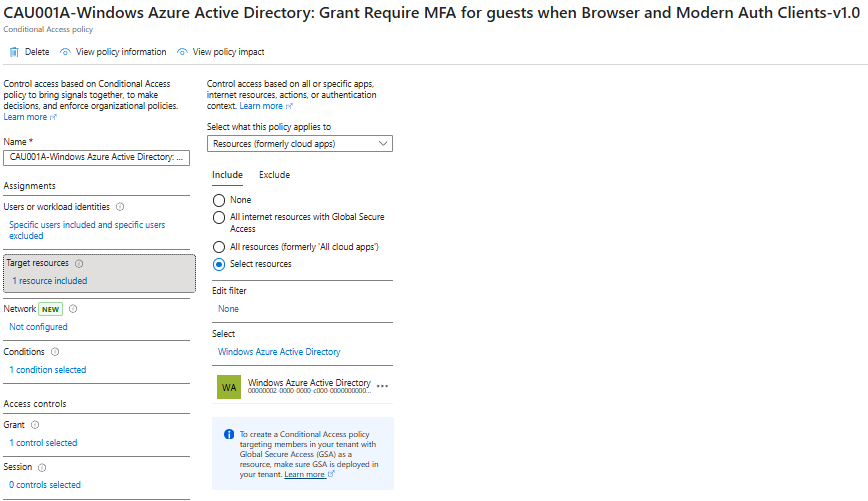
The resulting Conditional Access policy should look similar to the displayed CA policy below:
Modifying Supporting Conditional Access Policies
In addition to the main block policy, the Require MFA for all cloud apps policy must be adjusted to ensure dependent services are accessible. A recent article by Tony Redmond (Office365ITPros, February 2024) explains that Microsoft Rights Management should be excluded to allow users to open protected documents under MFA enforcement.
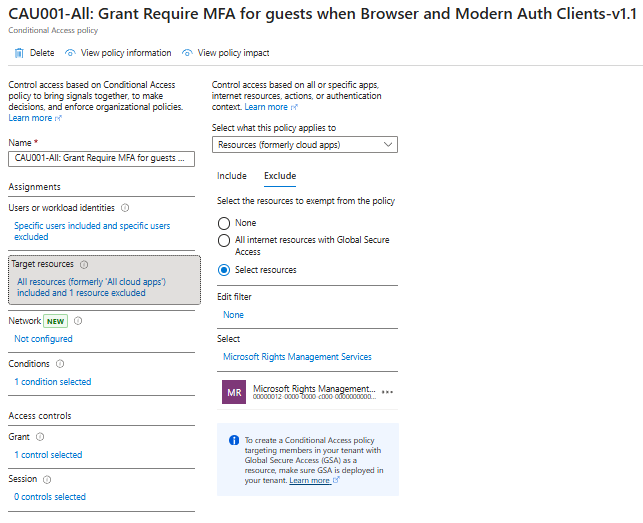
It is also advisable to create a separate Conditional Access policy targeting Windows Azure Active Directory specifically to require MFA, aligning with Microsoft’s documented recommendations for maintaining secure access to Entra ID core services.
Summary
With the introduction of the My Sign-ins app as a selectable resource in Conditional Access, administrators can now achieve a configuration where guest users can:
- Access only Office 365 and other explicitly allowed resources.
- Manage and re-register authentication methods without helpdesk intervention.
- Remain protected under strict Conditional Access enforcement.
This configuration requires fine-tuning multiple Conditional Access policies to ensure essential dependencies are not unintentionally blocked.
Doesn’t “Windows Azure Active Directory” exception create a bigger gap opening doors for some attacks?
It doesn’t look safe to exclude it.
Hi Vinc,
If you come from a situation where you allowed guests full access and only MFA, the Windows Azure Active Directory app was already open. Besides that I defined a add-on policy (per MS recommendation) which enforces MFA again on Windows Azure Active Directory: CAU001A-Windows Azure Active Directory: Grant Require MFA for guests when Browser and Modern Auth Clients-v1.0
So what Gap do you see? Maybe I missed something, would love to learn
Can I ask how do you exclude Microsoft Graph in CA? We excluded My Sign-Ins for our users but it appears Microsoft Graph and Office365 Shell WCSS-Server are also required in exclusions ? They are shown in CA app picker but greyed out saying “resource not supported in Conditional Access”. Regardless, users are blocked by Conditional Access as when trying to go to My Sign-ins – due to Microsoft Graph and Office365 Shell WCSS-Server
Hi Ilker,
That exclusion automatically takes place when you exclude one (as in 1) application from your Require MFA for Guest Users for All Cloud Resources policy. Besides the one application that you exclude, additional exclusions are automatically created.
/Kenneth
Thanks a lot for this most helpful =]
Can I ask a quick question around another policy. We have a compliant device policy targeted at all users, all resources etc for macOS. We exclude ‘User Registration app for Device Compliance’ from this policy but when users are registering they are getting blocked by ‘Windows Azure Active Directory (00000002-0000-0000-c000-000000000000)’
Do you know if it’s safe to also exclude Windows Azure Active Directory (00000002-0000-0000-c000-000000000000) and then obviously have the MFA targeted at it or any other work around?
Seems MS haven’t really updated their notes between themselves and JAMF since they rolled out that policy that:
“Microsoft Entra ID is updating Conditional Access enforcement so that resource exclusions no longer bypass policy evaluation for low-privilege scopes, affecting policies targeting All resources.”
Thanks a lot.
okay wow, I actually needed this today. felt like a little reset.