Microsoft is retiring SMS and voice call as sign-in methods in Entra ID, and making passkeys the default. That announcement is what usually starts this conversation, and it gets read as a compliance deadline: something to be done by a date, on Microsoft’s schedule.
It is worth understanding why the deadline exists. Microsoft is not retiring SMS because it is old. It is retiring SMS because attackers stopped bothering with passwords years ago and went after the second factor instead, and adversary-in-the-middle phishing kits now defeat one-time codes and push approvals as a matter of routine. The deadline is the defender’s side of an arms race, and it is already several moves in.
Which is also why “turn on passkeys” is not the end of the story. Through 2026, security researchers have been taking the passkey layer apart in public, with working tools. Some of what they found is patched. Some of it is not. And several of their recommendations are configuration choices, in your tenant, that no deadline will make for you.
So this post is about three questions, in order:
- What is actually at risk, and what the current attack research does and doesn’t change.
- What your tenant looks like today (IST), how to inventory it, and why each piece matters. This is the part most people skip, and it is the part that determines whether anything you do next is safe.
- What “good” looks like for your tenant specifically (SOLL), the five phases to get there, and why the order is not negotiable.
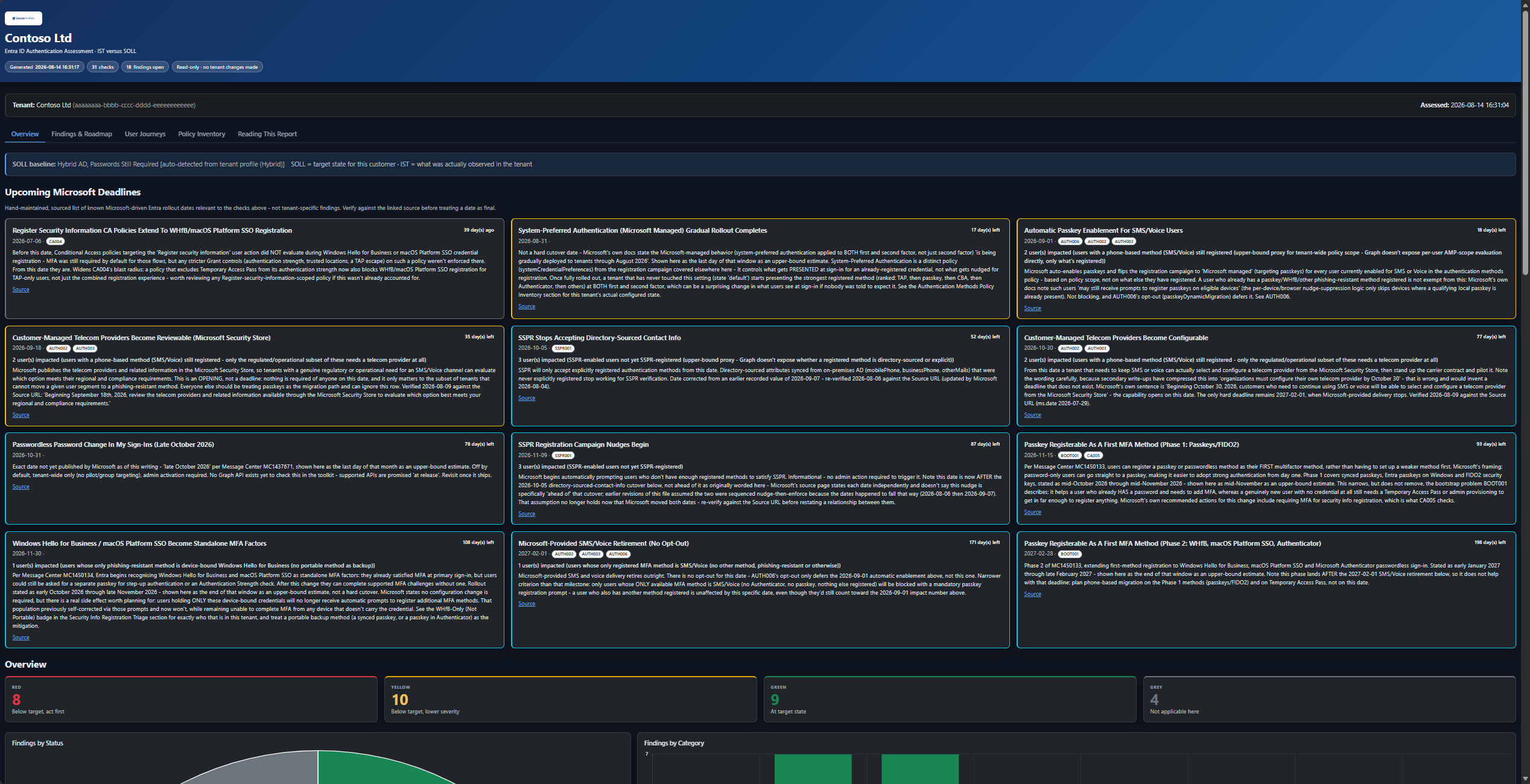
We use the Secure At Work Authentication Assessment Toolkit to run this kind of assessment against real tenants. It’s mentioned where relevant, but everything below applies whether or not you use it – it’s open source (MIT licensed) if you want to see exactly how any of this is actually checked, or run it yourself.
How to read this
It’s long, because the subject is. You are not meant to read it end to end in one go. Three routes through it:
| If you have | Read |
|---|---|
| Five minutes | The short version, immediately below. That’s the whole argument. |
| Twenty minutes | The short version, then Why now (what you’re defending against), then Part 3 (what good looks like) and Part 4 (the order to do it in). |
| You’re doing the work | All of it, but treat Part 2 as reference rather than narrative. It’s the longest section by far and it exists to be returned to when a specific mechanism misbehaves, not to be absorbed in one sitting. |
- How to read this
- The short version
- First, what a passkey actually is
- Why now: the attacker’s side of this
- Why this is harder than it looks
- Part 1: Inventorying IST: what to collect, and why each piece matters
- Part 2: How it all actually works together
- The registration campaign
- The Temporary Access Pass as bootstrap mechanism
- If the tenant is still federated, TAP does one more thing
- Three announced changes that shift this ground in late 2026
- The SSPR “two-gate” and its trap
- System-Preferred Authentication: a different mechanic from everything above
- Conditional Access on the registration page itself
- Who actually gets interrupted, and why you owe them a heads-up
- Where the prompt actually lands, and where it never will
- You can measure this, not just reason about it
- Tracing it end to end
- Part 3: SOLL: what “good” looks like, and why it isn’t one-size-fits-all
- Part 4: The path from IST to SOLL: five phases, and why the order matters
- Part 5: The SMS/Voice retirement, worked through the whole framework
- One known limitation worth naming
- The practical workflow, in short
- Sources and further reading
The short version
If you read nothing else:
- Inventory before you change anything. Entra’s authentication behaviour is the sum of eight separately configured surfaces. Any one of them read alone will mislead you. A Conditional Access policy requiring MFA means nothing if the users it targets only have SMS registered.
- Sequence matters more than speed. Enforcing MFA before people have registered a method locks them out. Removing SMS before a stronger method is registered removes someone’s only working factor. There is a correct order: capability, then registration, then removal, then enforcement.
- Tell people before Microsoft does. Several of these changes now arrive on Microsoft’s schedule whether or not you have communicated them. You can find out in advance exactly who will be interrupted.
- Phishing-resistant is a direction, not a finish line. Requiring a phishing-resistant authentication strength in Conditional Access is the right move and you should still do it. It is not, on its own, sufficient for your highest-value accounts, and the research below is specific about why.
- For admins, prefer device-bound passkeys and enforce attestation. This is the single clearest configuration recommendation to come out of the 2026 attack research, and it is two toggles in the same blade.
First, what a passkey actually is
Everything below depends on this, and it takes two minutes. If the mechanism is already familiar, skip ahead.
A password is a shared secret. You know it, the service knows it, and authentication means sending your copy so the service can compare. Every problem with passwords follows from that one property: a secret that has to be transmitted can be intercepted, replayed, guessed, reused across sites, or typed into a convincing fake. One-time codes and push approvals don’t fix this. They just add a second short-lived secret, which can also be relayed by someone standing in the middle.
A passkey is not a shared secret. When a user registers one, their device generates a pair of mathematically related keys. The private key stays on the device and is never transmitted anywhere, ever. The public key goes to Entra, and it is not sensitive: it can only verify signatures, never create them.
Signing in then works by challenge and response. Entra sends a fresh random challenge. The device signs it with the private key. Entra checks the signature against the stored public key. Nothing reusable crosses the network, so there is nothing for an attacker to capture and replay later.
Two details in that exchange are what actually kill phishing, and they are worth knowing by name because the rest of this post refers back to them:
- Origin binding. Before signing, the browser records the real domain of the page that asked for the signature, and it records the true one — a malicious page cannot forge this value. That domain is part of what gets signed. So when a user lands on a lookalike site sitting in front of the real one, the signature is bound to the attacker’s domain and Entra rejects it. This is the crucial difference from a one-time code: with a code, the proxy simply reads what the user typed and forwards it. With a passkey there is no code, and nothing for the proxy to pass along. The credential is also scoped to the site it was created for, so it cannot be offered elsewhere.
- Challenge freshness and signature counters. Every sign-in uses a new single-use challenge, so an old signature is worthless. Hardware authenticators additionally keep a counter that ticks up with each use, letting the service notice a cloned credential.
Both of those guarantees are the service’s job to enforce. That distinction matters, because it is precisely where the 2026 research found the cracks — not in the cryptography, which held.
Two more terms you’ll meet in your own tenant settings:
- Device-bound versus synced. A device-bound passkey is generated inside one piece of hardware (a security key, or a laptop’s TPM) and cannot leave it. A synced passkey is copied by a password manager into a cloud vault so it works across the user’s phone, tablet and laptop. Both are real passkeys and both defeat phishing. The difference is custody: a synced key’s safety ultimately rests on the account protecting that vault, which usually means a password again.
- AAGUID and attestation. Every authenticator model reports an identifier for its make and model, the AAGUID. Attestation is Entra demanding cryptographic proof of that identity at registration, which lets you allow only authenticator models you have approved. This is the toggle that separates “any passkey” from “a passkey from hardware we trust.”
With that in place, the rest of this post is about what to do with it.
Why now: the attacker’s side of this
The uncomfortable framing is that this is a cat-and-mouse game, and announcing a migration to passkeys does not end it. It moves it. Two pieces of published research from 2026 are worth knowing about before you decide what your target state is, because both of them change specific configuration decisions rather than just adding background anxiety.
Passkeys are being attacked as an implementation, not as a cryptosystem
At Black Hat USA 2026, Michael Grafnetter of SpecterOps presented the Pass-the-Passkey family of attacks: three exploitable zero-day vulnerabilities in Windows 11 and Entra ID, more than twenty attack techniques, and open-source tooling to reproduce them.
The important thing to understand is where the weaknesses were. WebAuthn’s phishing resistance comes from two properties: the browser records the true origin of the page (so a phishing site cannot obtain a usable assertion), and each ceremony uses a fresh single-use challenge with a signature counter (so an old assertion cannot be replayed). The cryptography holds. What Grafnetter found is that the surrounding implementation did not:
- Windows wrote complete WebAuthn assertions into an event log readable by authenticated unprivileged users, including remote ones. Patched on 14 July 2026 (CVE-2026-34348); fully updated systems now truncate the signature so the logged event is still useful for troubleshooting but no longer replayable. Microsoft rated it 6.5 Medium; the researcher filed it at 8.6 High.
- Entra ID did not enforce replay protection on WebAuthn assertions. Microsoft silently deployed signature-counter tracking in May 2026, which fixes this for FIDO2 security keys that maintain a counter. It is a partial fix: per the paper, “Windows Hello passkeys on Entra ID registered devices remain vulnerable to replay, because Windows Hello always sends a counter value of 0.” Some synced-passkey implementations don’t maintain counters either.
- A Credential UI window handle spoofing issue lets malware raise Windows authentication dialogs that look trustworthy, and flood the user with them until one is approved. Microsoft assessed this as Low severity in the Defense in Depth category, which in practice means it is not being fixed.
Two findings from that work deserve to be read twice by anyone who has just finished rolling out a phishing-resistant Conditional Access policy. First: the exploit “satisfies the phishing-resistant multi-factor authentication requirement enforced by conditional access policies.” Second: during testing against users licensed for Microsoft 365 E5, with Entra Identity Protection and Defender for Identity active, “no alerts or other security signals were generated.”
The paper’s own recommendation to administrators is correspondingly blunt: do not rely solely on the phishing-resistant MFA requirement in Conditional Access for high-value identities and applications, keep Windows 11 current, enforce passkey attestation for high-value users, and prefer device-bound passkeys over synced ones for those accounts.
Windows Hello keys can be borrowed without the PIN
Separately, Dirk-jan Mollema published Borrowing Windows Hello Keys for Authentication and Persistence. The preconditions are modest: a compromised user session on a device with Windows Hello for Business enrolled, and ordinary user privileges. No local administrator required.
Because Windows Hello has to support Remote Desktop scenarios, the key can be used to sign assertions through the CNG interface without prompting for a PIN or biometric at all, working instead from cached state. From there an attacker can sign the assertion needed to request a Primary Refresh Token, valid for 90 days and renewable. The persistence step is the one that matters most for how you read your own registration data: using the Windows Hello key counts as performing fresh MFA, so an attacker can use it to enrol additional passkeys. A user who shows as healthily registered for a phishing-resistant method can be healthily registered for the attacker’s method too.
Mollema is explicit that this is largely a consequence of how Windows Hello is designed rather than a bug with a clean fix, so the practical response is detection. His suggested signal is sign-ins where Windows Hello authenticated but no device ID is present, which is unusual outside of incognito sessions:
kusto SigninLogs | where AuthenticationDetails has '"authenticationMethod":"Windows Hello for Business"' | where DeviceDetail.deviceId == "" Worth pairing with generic monitoring for unexpected new Windows devices being registered by users, since device registration is the pivot in the chain.
The other persistence path: passkeys registered for a user
One more technique is worth naming because it is invisible in exactly the reports most people use to measure progress. Entra supports administrative passkey registration: an admin can enrol a passkey on behalf of another user. This exists for a good reason, such as mailing pre-registered security keys to remote hires.
An attacker holding UserAuthenticationMethod.ReadWrite.All or UserAuthMethod-Passkey.ReadWrite.All can call the same API to plant what the paper calls a shadow passkey: a persistent credential on a high-value account that keeps working after the legitimate user changes their password, because a passkey is an independent factor. It shows up in a registration report as an increase in phishing-resistant coverage.
This is the reason the assessment described below treats a per-user registration inventory and an audit-log review as two different things, and why “coverage went up” is not automatically good news. Registration counts answer “can this user authenticate strongly.” They do not answer “did this user register that themselves.”
None of this is an argument against passkeys
It would be easy to read the above and conclude that the whole migration is theatre. That is not what the researchers say, and it is not what the data says. Grafnetter’s own conclusion is that passkeys “are still a significant improvement over passwords,” and that organizations should “adopt them as soon as possible.”
The correct reading is narrower and more useful: passkeys decisively win the fight they were designed for, which is credential phishing at scale. The residual attacks above almost all require code execution on the user’s device or an already-privileged foothold in the tenant. That is a real risk and a much smaller and more expensive one than “an employee typed their password into a lookalike page.” You are trading a cheap, high-volume, remote attack for an expensive, targeted, local one. That is what winning a round looks like in this game. It is not the same as the game ending, which is why the target state below distinguishes between what is good enough for the workforce and what is good enough for a Global Administrator.
Why this is harder than it looks
Microsoft Entra ID’s authentication behavior is the sum of at least eight separately configured surfaces, each with its own admin blade and its own Graph endpoint:
- The Authentication Methods Policy (which methods are enabled, for whom, with what settings)
- Conditional Access policies (who’s required to do what, under which conditions)
- Authentication Strengths (custom combinations of methods that satisfy “strong” sign-in)
- Registration data (who’s actually registered what, per user)
- The Temporary Access Pass policy (a sub-setting of the methods policy, but with its own lifetime/one-time-use rules)
- SSPR policy, and this one is actually two policies: a general one for end users, and a completely separate, easy-to-miss one for administrators
- Sign-in and audit logs (what’s actually happening, versus what’s configured to happen)
- Tenant profile (hybrid vs. cloud-native, which changes what “good” even means)
None of these individually tells you whether the tenant is well protected. A Conditional Access policy requiring MFA means nothing if the users it targets have never registered a method stronger than SMS. A registration campaign targeting passkeys does nothing if FIDO2 self-service registration is switched off. An admin SSPR policy that’s deliberately disabled can silently strand admins with a broken registration prompt if nobody remembered to exclude them from the general user policy. Understanding the tenant means reading all eight surfaces together.
Part 1: Inventorying IST: what to collect, and why each piece matters
“IST” (German/Dutch for “as-is”) is simply the tenant’s actual current configuration, collected without judgment before any comparison against a target happens. Here’s what a complete inventory requires, and why each piece earns its place.
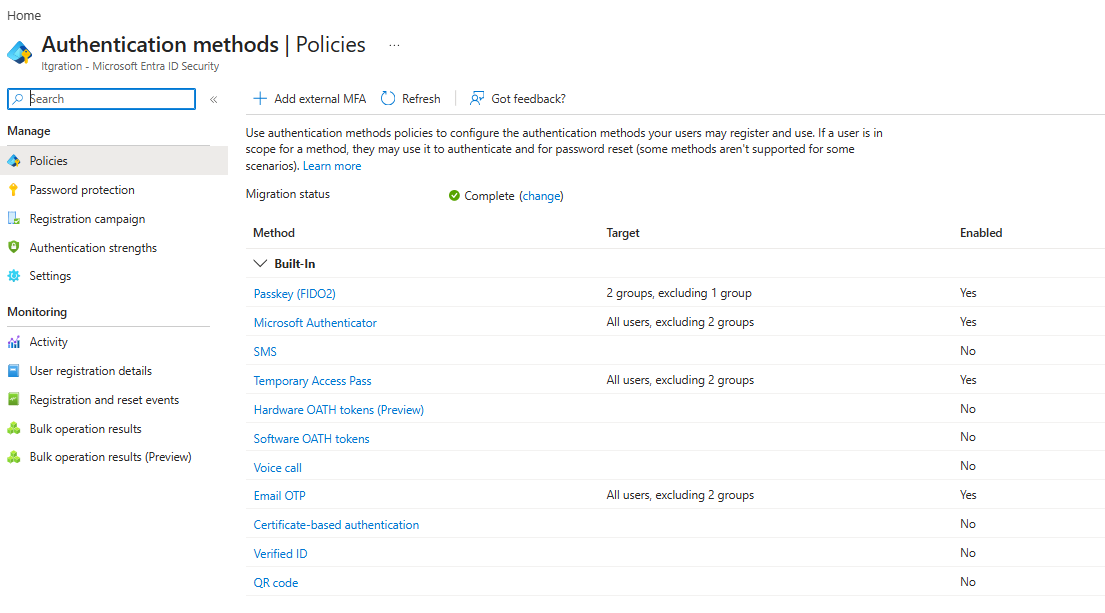
Authentication Methods Policy
Collect: for every method — is it on, who for, and with what settings.
For each method type (Microsoft Authenticator, FIDO2/passkey, SMS, Voice, Email, Temporary Access Pass, Software OATH, X.509 Certificate), the policy carries three things: its state (enabled/disabled), who it’s scoped to (includeTargets/excludeTargets, down to the all_users well-known target or specific groups), and method-specific settings that change what the method actually does.
That third category is where the interesting detail lives:
- FIDO2:
isAttestationEnforced(are only vetted hardware keys accepted, or anything claiming to be a passkey),isSelfServiceRegistrationAllowed(can a user register one themselves, or does an admin have to provision it) - Temporary Access Pass: default/minimum/maximum lifetime, and
isUsableOnce(single-use vs. multi-use) - Microsoft Authenticator: number matching required, location shown in the approval prompt
- The registration campaign (
registrationEnforcement.authenticationMethodsRegistrationCampaign): state (a genuine three-way Disabled/Enabled/Microsoft-managed, not on/off), which method it targets (microsoftAuthenticatororfido2), snooze duration, and whether snoozes are limited (forced registration after three skips) or unlimited. Part 2, on how these mechanisms actually interact, covers why “Microsoft managed” specifically deserves its own paragraph. - System-preferred multifactor authentication, found in the portal under Authentication methods > Settings, and called
systemCredentialPreferencesif you’re reading the policy through Graph: a genuinely separate setting, easy to conflate with the registration campaign but controlling something different: not what gets nudged for registration, but what gets presented at sign-in for a credential the user already has. Covered in full in Part 2, on how the pieces interact. policyMigrationState: not a setting you tune but a status value, reporting whether the tenant has actually finished migrating off the legacy per-user MFA policy and legacy SSPR policy onto this one. Deceptively easy to assume is a solved problem simply because those legacy policies can no longer be edited. Part 3, on what a defensible target state looks like, covers why that’s a real, checkable gap rather than historical housekeeping.
Target scoping matters here more than it looks: excludeTargets lives on the base authenticationMethodConfiguration type common to every method, while each method has its own typed includeTargets. Get the two confused and you’ll misread who a policy actually covers.
Conditional Access policies
Collect: every policy’s state, targets, grant controls — and one specific flag most people miss.
For each policy: its state, who it targets (all users, specific roles, specific groups), and what it requires (MFA, a compliant device, a custom authentication strength).
Then one extra question that deserves its own callout: does the policy target the “Register security information” user action? (urn:user:registersecurityinfo in Graph.)
That matters because Conditional Access targeting modes are mutually exclusive:
- A policy scoped to “All resources” does not also cover security-info registration.
- Only a policy explicitly scoped via user actions reaches that flow.
Miss this and you can fail in either direction. You believe registration is protected when it isn’t — or, the more dangerous one, you believe a policy targeting registration also covers ordinary sign-in, when it does not.
Authentication Strengths
Collect: whether a phishing-resistant strength exists — and separately, whether anything requires it.
Those are two different questions, and only the second one protects anybody. A tenant can have a perfectly good phishing-resistant strength defined and sitting completely unused.
Be precise about what “phishing-resistant” promises, because it’s easy to over-claim:
| It does stop | It does not stop |
|---|---|
| Adversary-in-the-middle relay at the moment a token is issued — the credential can’t be captured by a fake sign-in page and replayed, the way a password or OTP can. | A token that was already issued and then stolen off the endpoint afterwards — for example, infostealer malware harvesting session tokens and shipping them to an attacker-controlled command-and-control server for replay. |
The second column is an endpoint problem, closed by EDR, application control and next-gen antivirus — not by which authentication method was used to sign in.
So: rolling out passkeys is not a substitute for endpoint security work. The two address different stages of the same token’s lifecycle.
Per-user registration data
Collect: userRegistrationDetails — the single richest source in the whole inventory.
This is the one that turns a tenant-wide configuration review into a per-person work list. For every user it reports isAdmin, the SSPR pair isSsprEnabled / isSsprRegistered, and, crucially, methodsRegistered — the actual list of methods that specific person has set up.
What that buys you. Six populations, each needing something different:
| Population | Why they’re their own group |
|---|---|
| No phishing-resistant method at all | Needs active nudging toward one. |
| *Phishing-resistant method plus a phone fallback* | A live downgrade-attack surface — an attacker can force the weaker method even though a stronger one exists. Remove the fallback once it’s no longer needed. |
| Guest / external users | |
| *Windows Hello for Business as their only strong method* | WHfB is bound to one device. A real problem for admins who don’t routinely sign in interactively from a managed machine. |
| Registered a method the tenant has since disabled | Structurally unusable now — safe to clean up. Same list surfaces methods unused in a long time, a proxy for staleness. |
| *SMS/Voice as their only method* | Exactly the population February 2027’s blocking enforcement targets. Prioritise ahead of people who have SMS alongside something stronger. |
That last row is the one to start with if you only do one thing with this data.
Two field names that look interchangeable and aren’t
Worth its own heading, because picking the wrong one quietly produces a number you’ll act on.
Trap one: isMfaRegistered versus isMfaCapable. Microsoft’s definitions differ by one clause:
| Field | Microsoft’s wording |
|---|---|
isMfaRegistered | “has registered a strong authentication method … The method may not necessarily be allowed by the authentication methods policy.” |
isMfaCapable | “has registered a strong authentication method … The method must be allowed by the authentication methods policy.” |
Coverage built on isMfaRegistered counts people who cannot actually complete MFA, because the only method they registered has since been switched off tenant-wide. Use isMfaCapable for any readiness number you intend to act on.
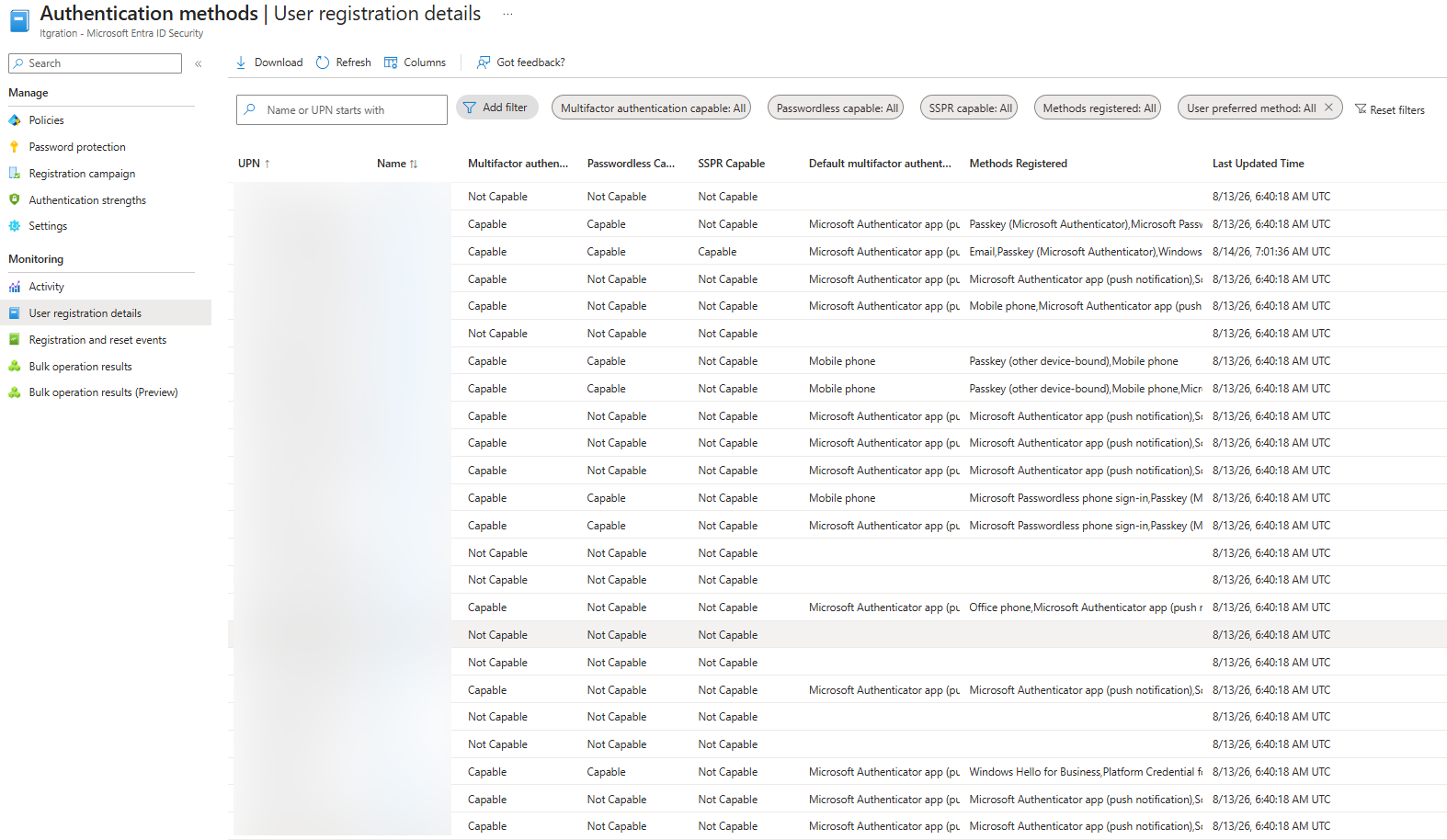
The timing is what makes this bite. Turn off SMS and Voice — Phase 4 of this very post — and those users keep isMfaRegistered = true on a dead registration while isMfaCapable correctly flips to false. A coverage metric on the wrong field looks healthiest precisely when it has become least true. (This toolkit had that bug until 2026-08-09.)
The gap between the two is worth reporting in its own right: someone registered but not capable appears on no “not registered” list, and is one policy change from being locked out of their own MFA. SSPR has an equivalent pair — isSsprCapable is exactly isSsprEnabled AND isSsprRegistered.
Trap two: isPasswordlessCapable is not phishing-resistant coverage. It’s policy-aware in the same useful way, which makes it tempting to read as the answer to this whole post. It isn’t, and the two sets disagree in both directions:
- Microsoft’s definition covers FIDO2, Windows Hello for Business, and Microsoft Authenticator passwordless phone sign-in. That last one is push-based — passwordless, but still phishable.
- Certificate-based authentication is phishing-resistant by Microsoft’s own list, and isn’t named in the passwordless definition at all.
So a tenant can raise its passwordless number by pushing phone sign-in without getting meaningfully harder to attack. Track passwordless capability and phishing resistance as two numbers, treat a widening gap between them as a finding rather than progress, and measure phishing resistance from methodsRegistered — the actual methods — not from a capability flag.
The authorization policy: the admin SSPR trap
Collect: one Graph-only setting with no switch in the portal — allowedToUseSSPR.
You won’t stumble across this one, because there is nowhere in the portal to stumble across it. It lives on /policies/authorizationPolicy and is readable only via Graph.
Here’s why it matters. Administrators don’t use the general SSPR configuration at all. They get password reset through their own built-in two-gate policy — two methods required, security questions prohibited — completely independent of whatever you’ve set for end users. allowedToUseSSPR is the actual switch that turns admin SSPR off.
And that creates a trap Microsoft documents explicitly. Turn admin SSPR off, but forget to also exclude admins from the general user-facing SSPR policy, and here is what those admins experience:
- They’re still prompted to register for SSPR, because the user policy still targets them.
- They open the registration page and are told they can’t register any method.
- They’re stuck in that loop, because admin SSPR is off at the tenant level regardless of what the user policy says.
Two settings, each individually defensible, combining into a dead end. That pattern repeats throughout this post.
Sign-in and audit logs
Collect: two different time windows, for two different questions.
- A short window (7 days is a reasonable default) catches successful legacy-authentication or device-code-flow sign-ins. Both bypass modern Conditional Access entirely, so either one succeeding is a red flag.
- A deliberately wider window checks whether registered methods are actually being used. Registration alone doesn’t prove a method still works — the device it lived on may be long gone.
Be careful what you ask for on that second one. Entra caps how far back you can look: sign-in logs are retained seven days on Entra ID Free, 30 days on P1 or P2. Full stop.
Ask for 90 days and you get back whatever was retained, with nothing in the response telling you the window was truncated. So 30 days is the real ceiling for most tenants, and any “not used recently” conclusion means not within retention, never not ever. If you genuinely need longer history, that’s an argument for routing sign-in logs to Azure Monitor or a storage account — not for asking Graph for a window it cannot serve.
Audit logs are a separate job: they catch unexpected credential changes on break-glass accounts, and Conditional Access policy modifications made by applications rather than people. Both are classic incident indicators.
Tenant profile
Collect: one field that changes how you judge everything else.
organization.onPremisesSyncEnabled tells you whether this tenant is hybrid (synced with on-premises Active Directory, currently or formerly) or cloud-native.
That single fact changes what “good” means for the whole rest of the inventory. A hybrid tenant may legitimately still need passwords and SSPR long after a cloud-native, passwordless-first one has moved past both. Judge the findings against the right target, not a universal one.
Part 2: How it all actually works together
Individual settings are necessary but not sufficient. The interesting failures happen at the seams between them, where one setting’s behavior depends entirely on another one you weren’t looking at.
The registration campaign
A registration campaign nudges users to set up either Microsoft Authenticator or a passkey — never both at once. It’s one target method per tenant.
The mechanics:
- Users complete their normal sign-in and MFA first. Only then are they prompted.
- Declining (“Skip for now”) starts the snooze, configurable from 0 to 14 days.
- With limited snoozes on, they’re forced to register after three skips. Without it, they can defer indefinitely.
Three behaviours catch people out:
- The passkey nudge is evaluated per device-and-browser combination, not per user account. A user with Windows Hello for Business is skipped on Windows + Chrome, then nudged the moment they sign in from a Mac, because that credential doesn’t travel.
- Nobody is nudged in the same session they just registered in.
- The nudge is silently suppressed for anyone a Conditional Access policy blocks from reaching the registration page. That’s why the CA trap below matters: the failure isn’t loud, it’s just an absent prompt that nobody notices.
The campaign’s state is three-valued, not on/off:
| State | What it means |
|---|---|
disabled | Off. |
enabled | Your configured targeting and snooze settings apply exactly as set. |
default | Shown in the admin center as “Microsoft managed”. Microsoft’s own defaults apply instead: currently documented as targeting passkeys over Authenticator, a 1-day snooze, unlimited snoozes, and every MFA-capable user in scope. |
Two warnings about that third value.
Microsoft’s own docs contradict each other on it. At the time of writing, the resource reference says the default is disabled, while the how-to article describes “Microsoft managed” as a new set of defaults actively rolling out. That’s a documentation bug, not a product one, so it may be tidied up by the time you read this — check both pages rather than trusting this observation.
And an announced start date is not a guarantee. Tenants are moved onto new defaults in batches, on Microsoft’s schedule, and that progress is invisible from inside the tenant. A tenant reading “Microsoft managed” today could be on the old behaviour, the new one, or midway between, no matter how long ago the announced date passed. If you need certainty about what a specific user is being shown, check that tenant directly.
A third question, easy to answer wrong in either direction: does “Microsoft managed” mean you can’t scope the campaign to a specific group? No. Microsoft’s own admin-center guidance states it directly — when Microsoft managed is selected, the target authentication method, snooze duration, and snooze count are set automatically and can’t be configured, but include/exclude targets can still be configured. An admin can leave a campaign on “Microsoft managed” and still point it at one group.
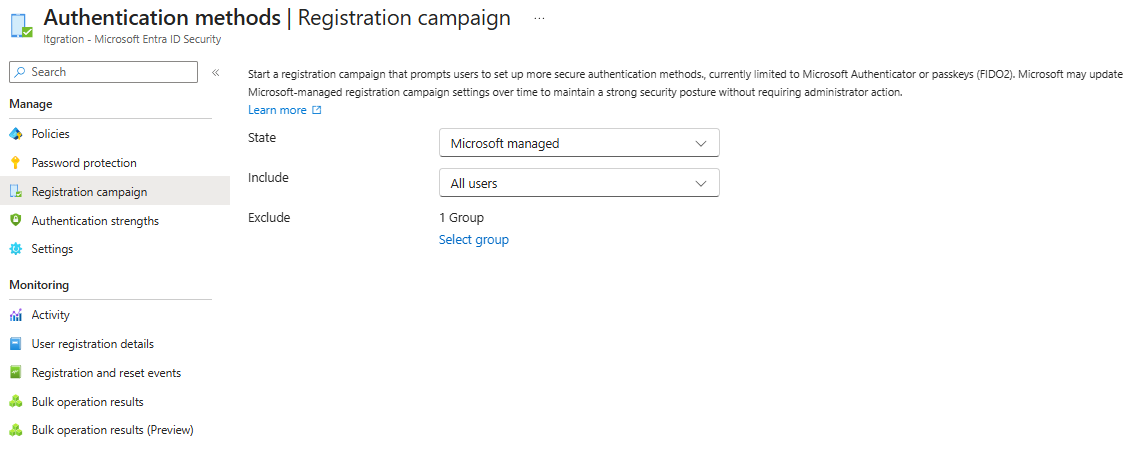
The real uncertainty sits one level down, and it only shows up when a Microsoft-managed campaign has no custom targets configured at all — the common case, since flipping the state to “Microsoft managed” and leaving everything else untouched is the whole appeal of the setting. Microsoft documents that state as rolling out incrementally per tenant: the actual population moves from voice-call-or-text-message users to all MFA-capable users, on Microsoft’s own batch schedule, and which stage a given tenant is currently in isn’t exposed through Graph. So the honest answer to “who does this campaign actually reach today” is a range, not a number, and the range only collapses to a specific group when an admin has explicitly set one — which is a genuinely different kind of uncertainty from “campaign targets a group whose membership isn’t resolved,” even though both show up as the same “Scope uncertain” warning on a dashboard forecast card. Telling the two apart is worth doing before acting on either: one sends you to go look up a group’s membership, the other sends you nowhere, because there is no group to look up.
There’s one more way a campaign can quietly do nothing, and it’s the one most likely to catch out someone who has otherwise done everything right.
Microsoft documented that users are not nudged at all if their passkey profile carries any of these: synced-only, device-bound-only, attestation enforced, or AAGUID key restrictions.
Read that list again with a hardening mindset. Two of those are things a security-conscious admin actively wants.
So: enforce attestation so only vetted authenticators can register. Add an AAGUID allow-list so only approved models are accepted. Switch on a registration campaign to drive adoption. The campaign now reaches nobody.
Nothing errors. The admin center shows the campaign configured and enabled. Registration coverage simply doesn’t move — and the obvious conclusion, users are ignoring the prompt, is wrong. There was no prompt. The same restriction also blocks the automatic switch to passkey targeting under Microsoft-managed state.
Correction (2026-09-09): this reversed. Microsoft has rewritten this page. Under the Microsoft managed campaign state, most of these same restricted profiles now qualify a user for the nudge instead of suppressing it — including attestation-enforced, provided Microsoft still evaluates the account as needing a nudge. See the update at the end of this post for the corrected eligibility table and what’s still unaffected (the Enabled campaign state, and AAGUID allow-lists that don’t include a supported provider). The sequencing advice below still holds regardless of which rule set is live — it just no longer rests on “the campaign reaches nobody” as the reason.
The fix is sequencing, not choosing. Drive registration first, tighten afterwards.
The Temporary Access Pass as bootstrap mechanism
A TAP is how a user with nothing registered yet gets into the system at all. An admin creates it, the user enters it at Security Info instead of a password, and it’s good for either one sign-in or several within its lifetime window.
Once signed in with a TAP, they can register something stronger: a passkey (if FIDO2 self-service registration is allowed), Microsoft Authenticator, or — on Windows — join the device and set up Windows Hello for Business in the same flow.
One operational nuance to plan around. Registering a passwordless method with a one-time-use TAP must happen within 10 minutes of the TAP sign-in. That clock is why organizations doing device enrolment plus WHfB setup in one sitting typically either issue two single-use TAPs, or enable a multi-use TAP so the same code covers both steps without a hard deadline running underneath.
The cross-device trap. There’s a second nuance, and it only appears when the device the TAP is entered on isn’t the device the passkey will live on.
Registering “Passkey in Microsoft Authenticator” from a laptop, with the phone holding the actual credential, is supported. Security Info hands off to the phone via a QR code or an app-open prompt.
What it does not do is carry the laptop’s TAP session across. The phone has to sign in and complete MFA inside the Authenticator app as its own separate step.
For a brand-new user, that’s a dead end. Their only credential was a single one-time-use TAP, and it was spent reaching Security Info on the laptop. There is nothing left to authenticate the phone with.
Microsoft documents a fallback for exactly this gap — a Bluetooth-proximity “WebAuthn flow” that skips the second sign-in. It is explicitly unavailable whenever FIDO2 attestation is enforced.
So push both settings to their generally-recommended values at the same time, one-time-use TAP and attestation enforced, and a brand-new user has no route through this bootstrap path at all. Neither setting is wrong. The combination is.
Windows Hello for Business sidesteps this entirely: it’s bound to the same machine the TAP was entered on, so there’s no handoff. That is the real reason WHfB rollouts often look further along than passkey rollouts even when both are technically “enabled.”
The fix, if cross-device passkey bootstrap matters for a given tenant, is a short-lived multi-use TAP scoped to onboarding rather than a strict one-time-use TAP.
If the tenant is still federated, TAP does one more thing
Everything above assumes users authenticate against Entra. Plenty of hybrid tenants don’t yet: they’re federated to AD FS or a third-party identity provider, and they’re partway through moving to managed cloud authentication using Staged Rollout, the feature that flips a pilot group from federated to managed so you can test before converting the whole domain.
The relevant mechanic is that moving a user into Staged Rollout doesn’t take effect immediately. Microsoft’s own description: the switch to managed authentication lands “after the user completes one more interactive sign-in using their existing federated login.” So the very users you’re moving towards passwordless get sent back to the old identity provider, with a password, one last time. Removing a user from Staged Rollout works the same way in reverse.
TAP short-circuits that, and this is the part worth knowing, because Entra evaluates a TAP before it decides to redirect the user to their federated identity provider. Issue a TAP right after adding someone to the Staged Rollout group and their first sign-in is already managed: no final trip through AD FS, no password, and from there they can register Authenticator or a passkey exactly as any cloud-native user would. It is the same bootstrap pattern described above, doing double duty as a migration step.
Two related constraints matter if the tenant is in this state, because they quietly contradict advice given elsewhere in this post. Self-service password reset with writeback to on-premises AD is not supported while Staged Rollout is enabled for a security group; Microsoft says it works in some cases but can’t be guaranteed. So the SSPR coverage targets discussed later are worth pursuing, but the writeback path specifically is unreliable until the domain conversion finishes. And Windows Hello for Business hybrid certificate trust, where the federation server acts as the registration authority, along with smartcard users, isn’t supported on Staged Rollout at all, which takes the WHfB-shaped bootstrap route off the table for exactly the population most likely to have it.
The overall framing Microsoft now uses is worth repeating to anyone treating this as a steady state: Staged Rollout “is not designed to be a permanent configuration,” a federated identity provider should stay in place as a fallback while testing, and the domain cutover to managed authentication is a separate step that Staged Rollout never performs on its own. A tenant that has been “halfway migrated” for two years is carrying the constraints above the whole time.
The assessment reads this directly for hybrid tenants and reports it as inventory rather than as a pass or fail, precisely because there’s no value of “enabled” that’s correct for everyone. What it does flag are the three caveats above, against the specific findings each one qualifies, so a reader working through the SSPR or TAP recommendations sees why they don’t fully apply yet.
Three announced changes that shift this ground in late 2026
All three of the following are announced but not yet shipped at the time of writing, and each changes the bootstrap picture enough to be worth designing around now rather than reacting to later.
A passkey becomes registerable as a first MFA method. Today the awkwardness is circular: you want people on passkeys, but the registration path often assumes they already have some other MFA method to authenticate the registration with. Microsoft is removing that assumption, so a password-only user can go straight to a passkey rather than setting up something weaker first. Rolling out in two phases: synced passkeys, Entra passkeys on Windows and FIDO2 keys around mid-October to mid-November 2026, then Windows Hello for Business, macOS Platform SSO and Authenticator passwordless around January to February 2027.
This narrows the bootstrap problem without closing it, and the distinction is worth being precise about because it determines whether you still need Temporary Access Pass. It helps a user who already has a password and needs to add a strong method. It does nothing for a genuinely new user holding no credential at all, who still needs a TAP or admin provisioning to get far enough in to register anything. Day-one onboarding and lost-credential recovery are unchanged. Note too that the second phase lands after the February 2027 SMS/Voice retirement, so if you’re planning phone-based migration, plan it on the first phase and on TAP, not on that date.
Windows Hello for Business and macOS Platform SSO become standalone MFA factors. These already satisfied MFA at primary sign-in, but users could still be asked for a separate passkey during a step-up prompt or an Authentication Strength check. That gap closes around October to November 2026, which is a real usability improvement for anyone who lives on one managed device.
It also carries a consequence that deserves more attention than it usually gets, because it is stated plainly in Microsoft’s own announcement and is easy to skim past: users holding only these device-bound credentials will no longer be automatically prompted to register additional MFA methods. Consider what that means. Right now, someone whose sole strong credential is Windows Hello on one laptop keeps getting nudged toward a second method, and some fraction of them act on it, so the population slowly self-corrects. After this change the nudging stops, while the underlying exposure is completely unchanged: they still cannot complete MFA from any device that doesn’t carry that credential. Lose or replace the laptop and they’re at the service desk.
So a group that was previously shrinking on its own quietly becomes static. That’s worth finding deliberately, because it is exactly the sort of risk that produces no signal until someone needs help and can’t get it. The fix is unglamorous: identify who has only a device-bound credential and get them a portable backup (a synced passkey, or a passkey in Microsoft Authenticator) as a deliberate act, rather than assuming the prompts will keep handling it. They won’t.
Passwordless users get a way to change a password they’ve never used. This sounds like a footnote and isn’t.
Onboard someone the modern way — TAP into a passkey on day one — and they may go their entire time at the company without ever typing their password. But the password still exists in the directory. It is still an authentication factor.
Then something finally needs it: a legacy app, a break-glass procedure, a support process that hasn’t caught up. And they cannot change it. Changing a password today requires one of two things, and they have neither:
- Knowing the current password. They don’t. They never used it.
- Going through SSPR. They may never have registered for it — particularly since the SSPR registration interrupt can be skipped indefinitely when no MFA registration policy sits alongside it, as covered just below.
A stale password that nobody knows and nobody can rotate, quietly accumulating across a passwordless population, is not a great thing to be building.
From late October 2026, users can change their Entra password from My Sign-Ins by authenticating with a passkey, FIDO2 key or Windows Hello for Business, with no knowledge of the current password and no SSPR registration required. Two details decide whether you actually get this, and both are easy to skim past: it is off by default and needs an administrator to switch it on, and it is tenant-wide with no per-user or per-group scoping at release, so it’s on for everyone or for nobody. Nothing happens to you here. This is one you have to go and choose, which in practice makes it exactly the sort of change that gets read in a Message Center post, nodded along with, and then never actioned.
The SSPR “two-gate” and its trap
Combined registration serves both MFA and SSPR from the same wizard, but the two policies that govern it are genuinely separate. For ordinary users, if only SSPR is enforced (no MFA registration policy alongside it), the registration interrupt can be skipped indefinitely. That’s a real, quiet governance gap: SSPR enforcement without MFA enforcement never actually forces completion. For administrators, the picture changes entirely: they run on their own built-in two-gate policy, independent of the general SSPR setting. That’s exactly why allowedToUseSSPR being explicitly false combined with admins still being in-scope for the user policy produces the broken, confusing prompt described above.
A third setting hides in a page that doesn’t look like it belongs to either gate. The classic Password reset > Registration blade — old-style SSPR administration, not the modern Authentication Methods policy — carries its own “Number of days before users are asked to reconfirm their authentication information” field, independent of both settings above. It has no Graph v1.0 or beta property found so far; it isn’t part of authenticationMethodsPolicy at all, and the property that looks like it should be the answer, reconfirmationInDays (beta), is a different setting on the modern policy. A tool — or a person — reading only the modern policy and finding reconfirmationInDays empty will report “no periodic reconfirmation configured,” and be wrong for any tenant where the classic blade’s field is set. Worse, this isn’t only a premigration concern: a live tenant confirmed the classic field can still read a real, non-default value (180 days — Microsoft’s own SSPR tutorial uses that exact number as its example) with policyMigrationState showing Complete in the admin center. That’s a sharper version of the same trap Part 3 covers for migrationComplete generally — Microsoft names exactly two legacy SSPR elements as confirmed to survive full migration (the number-of-methods-required-to-reset control, and the admin SSPR policy), and this reconfirmation field was never on that list, which is silence about its fate, not a documented “ignored.” Until that’s resolved one way or the other, the honest answer for any tenant is “check the classic blade directly,” not “assume the modern policy’s silence means nobody is asked.”
That classic blade doesn’t carry its own scope, though — it inherits whoever the Properties page already enabled. The same tutorial’s two steps sit right next to each other for a reason: step one is Properties > Self service password reset enabled, set to None, Selected (a specific group), or All; step two is the Registration page’s “Require users to register” toggle and reconfirmation interval, configured on a completely different page. It would be reasonable to assume the second page’s settings apply tenant-wide regardless of the first, since nothing on the Registration page itself mentions scope. Microsoft’s own docs rule that out directly, in a Note immediately after the Registration steps:
“The interruption to register security information during sign-in only occurs if the conditions configured on the settings are met. This only applies to users and admin accounts that are > enabled to reset passwords using Microsoft Entra self-service password reset.“
So a Properties page scoped to Selected with a two-person pilot group means the Registration page’s interrupt and reconfirmation interval apply to exactly those two people — not the tenant. Everyone outside that group was never in scope for SSPR at all, so there’s nothing for the Registration page’s settings to interrupt them about. Worth checking directly before reading a reconfirmation finding as tenant-wide: it’s only as wide as whatever Properties says.
System-Preferred Authentication: a different mechanic from everything above
Every mechanism so far governs registration: what gets set up, and when a user is nudged to set something up. System-preferred multifactor authentication (systemCredentialPreferences in Graph, and under Authentication methods > Settings in the portal) is something else entirely: it governs what gets presented at sign-in for a credential the user already has. Easy to conflate with the registration campaign, and genuinely a distinct setting with distinct user-experience impact, confirmed against Microsoft’s own concept article (concept-system-preferred-authentication):
- Disabled: no change to sign-in order; the user’s own default/last-used method keeps showing up.
- Enabled: the strongest registered method is presented first, but only for the second factor. First-factor sign-in (e.g. the password prompt) is unchanged.
- Default / unset (“Microsoft managed”): the counterintuitive part is that the unset state is the more far-reaching one, applying the ranking to both first and second factor. A user with a password and a passkey registered gets prompted with the passkey first, at first-factor sign-in, ahead of the password screen entirely.
The ranking is published, and worth reading in full rather than assuming, because it is explicitly not fixed. Microsoft’s own words: “The method order is dynamic and updates as the security landscape changes.” As published today:
| Rank | Credential | Satisfies |
|---|---|---|
| 1 | Temporary Access Pass | First factor + MFA |
| 2 | Passkey (security keys, passkeys in Authenticator, synced passkeys, WHfB, macOS Platform SSO) | First factor + MFA |
| 3 | Certificate-based authentication | First factor, or first factor + MFA |
| 4 | Microsoft Authenticator notifications | First factor + MFA |
| 5 | External MFA | MFA |
| 6 | TOTP (hardware or software) | MFA |
| 7 | Telephony (SMS and voice) | MFA |
| 8 | QR code | First factor |
| 9 | Password | First factor |
That “dynamic” caveat is not theoretical: certificate-based authentication used to sit last in this order because of known issues, and moved to third on March 18, 2026 once they were resolved. If you have CBA deployed, that reordering has a sharp edge Microsoft flags directly: under the Microsoft-managed state, users on a device that has no certificate will fail immediately during CBA and have to select “Sign in another way” manually to get anywhere. A method jumping from ninth to third is exactly the kind of change nobody re-reads the ranking for.
Two more behaviors worth knowing. Windows Hello for Business and macOS Platform SSO only work as a first factor, so at first-factor sign-in they’re offered only when the user most recently signed in with a passkey; if their only registered passkey is one of those two and their last sign-in wasn’t a passkey, the system skips it and offers the next method down instead. And federated users are exempt at the first factor entirely: they keep going to their own identity provider, with system-preferred applying only to their second factor.
The user can always back out via “Sign in another way,” but the default screen they see changes, which is exactly the kind of thing that generates a wave of “why does my sign-in look different” tickets if nobody was told to expect it. The Microsoft-managed behavior is being gradually rolled out through August 2026 gradually rolled out, now expected to complete by late September 2026 (corrected 2026-09-02 – see the update at the end of this post), so two tenants that have both left this setting untouched may currently be experiencing different things, purely based on where they are in that rollout. Microsoft is explicit about how to tell: if first-factor sign-in doesn’t reflect the ranking while the state reads Microsoft managed, the rollout simply hasn’t reached that tenant yet.
One practical constraint that catches people staging this: you can include or exclude exactly one group, not several. Piloting to three departments means one group containing all three, not three include targets.
One nuance worth carrying into the next section, with a caveat about its shelf life: Conditional Access is validated only for the second factor. It doesn’t see, and can’t override, what system-preferred authentication decides to show at the first factor, because authentication happens first and only afterward does Conditional Access evaluate authorization. The caveat is that Microsoft files this under “Known limitations” rather than describing it as designed behavior, and a known limitation is a candidate for being fixed. Treat it as true today rather than as architecture, and re-check it before building a control that depends on it staying true.
Conditional Access on the registration page itself
There are two separate failure modes here, and they fail in opposite directions. Worth naming both before getting into the mechanics of either.
Failure mode one: no policy targets the registration page at all.
Nothing targets urn:user:registersecurityinfo, so the page where users register a new authentication method has no Conditional Access protection of its own — no matter how solid the rest of the baseline looks.
A tenant can have legacy auth blocked, MFA required for all users, and admin roles protected, and still have zero control over this specific page. None of those policies extend to it, because targeting resources and targeting user actions are mutually exclusive choices within one policy: a baseline “All resources” policy simply never reaches it.
The practical result: anyone who has completed first-factor sign-in can reach that page unchallenged, whether or not they have MFA registered yet.
The fix is a policy that explicitly targets the user action and requires at least a plain mfa grant control.
The second failure mode is the opposite: such a policy exists, but overshoots.
A policy scoped to urn:user:registersecurityinfo governs how and where users may register or update security info — often used to confine that to a trusted network or compliant device during onboarding. Reasonable.
The trap. If that policy’s grant control is a custom authentication strength whose allowedCombinations omits temporaryAccessPassOneTime and temporaryAccessPassMultiUse, then a user whose only way in is a TAP can never reach the page that would let them register something better. That is precisely the population every mechanism above is pushing toward passkey registration.
Note what does not cause this: a plain mfa built-in control is fine, because a TAP satisfies it generically. Only a custom strength with no TAP escape hatch does it.
As of 2026-07-06 this same scope also governs Windows Hello for Business and macOS Platform SSO registration, which it previously didn’t evaluate at all — widening the blast radius of any policy that already has this gap.
One boundary worth keeping straight: this policy controls whether the registration page is reachable. It has no say over what System-Preferred Authentication presents on the way there.
Who actually gets interrupted, and why you owe them a heads-up
Everything above describes mechanisms. Put them together and a practical question falls out that rarely gets asked until it’s too late: on Monday morning, which of your people are going to be stopped mid-sign-in and asked to do something, and do they know it’s coming?
This matters more than it sounds. A registration prompt that arrives unannounced isn’t a technical failure, it’s a support call, and at scale it’s a wave of them. Worse, it teaches users that unexpected credential prompts are normal, which is precisely the instinct you spend the rest of your security programme trying to build out of them. The mechanics are all documented; what’s usually missing is that somebody worked out the affected population in advance and sent an email.
Four different interrupts can fire, and they’re worth separating because they hit different people and behave differently once they arrive:
The automatic passkey enablement on September 1, 2026. Anyone still enabled for SMS or Voice gets auto-enabled for passkeys and nudged on their next MFA sign-in. This is the one to plan around first, because the timing isn’t yours: it happens whether or not you’ve configured a campaign, and whether or not you’re ready. Snoozes are unlimited by default, so it’s a recurring prompt rather than a hard stop, which is its own kind of problem: a nag nobody is required to resolve tends to get trained out rather than acted on.
A passkey registration campaign, if you’re running one. Fires after a successful MFA for in-scope users without a passkey on that particular device and browser.
A Microsoft Authenticator campaign, same mechanic, different target. Note you can’t run both at once.
The SSPR registration interrupt, for users who are SSPR-enabled but haven’t registered. This one has a sting worth knowing: per Microsoft’s own combined-registration documentation, if only an SSPR policy is enforced and no MFA registration policy sits alongside it, users can skip the interruption indefinitely. So it’s not a rollout that completes. It’s a prompt that appears forever, gets dismissed forever, and quietly never improves your SSPR coverage.
There’s also a fifth case that isn’t a nudge so much as a defect, and it’s specific enough to be worth checking for by name: an administrator who is in scope for the user-facing SSPR policy while admin SSPR is disabled tenant-wide gets interrupted to register, and is then shown a message saying they can’t register anything. Microsoft documents both the behavior and the fix (explicitly exclude administrators from the user SSPR policy when admin SSPR is off). It’s the kind of thing that gets reported as a bug by a frustrated admin months after someone turned off admin SSPR for good reasons.
Where the prompt actually lands, and where it never will
Knowing who is eligible is only half of it. The other half is where, and this is where a lot of rollout plans quietly mis-forecast, because a nudge is a piece of UI shown during a sign-in, and a large share of real-world sign-ins have no UI at all.
Microsoft splits sign-ins into interactive and non-interactive, and the definition of the latter does the work here: non-interactive sign-ins are “performed by a client app or OS components on behalf of a user and don’t require the user to provide an authentication factor,” with Entra refreshing the token “behind the scenes, without interrupting the user’s session.” No authentication factor is requested and the session is never interrupted, so there is no MFA completion to nudge after and no surface to nudge on. Microsoft’s own examples of non-interactive sign-ins include a client app using a refresh token to get an access token, single sign-on to a Windows app on an Entra-joined PC, and signing in to a second Office app while a session already exists on the device.
That last one is the Outlook case exactly. A user who is already signed in on their laptop and opens Outlook in the morning is usually generating a token refresh or an SSO event, not an interactive authentication. They will not see a nudge, no matter how correctly the campaign is configured, because nothing interrupted them.
Roughly where things land:
- Browser sign-in that actually completes MFA. This is the main event, and effectively the only reliable one.
- Native and desktop apps. Sometimes. Microsoft says registration campaigns “support embedded browser views in certain applications,” which is deliberately non-committal, and explicitly excludes out-of-box experiences and browser views embedded in Windows settings.
- Anything non-interactive. Never, structurally. Token refresh, SSO on a joined device, opening a second Office app on a device that already has a session.
- Mobile. Depends on the campaign: passkey campaigns work on mobile browsers and native iOS apps, but not native Android; Authenticator campaigns aren’t supported on mobile at all.
- Linux. Not nudged.
- An existing SSO session. Not nudged, which is the same rule stated from the other direction.
The practical consequence is worth sitting with, because it changes what a flat registration number means. A user whose whole working pattern is “laptop stays signed in, open Outlook and Teams, tokens refresh silently” can go weeks without a single interactive browser sign-in, and therefore weeks without ever seeing a prompt you switched on a month ago. When coverage moves slower than expected, the intuitive read is that users are ignoring the nudge. Often they are genuinely never being shown it. Those two situations call for completely different responses: one needs a firmer campaign, the other needs an email, because no amount of campaign tuning will reach someone the campaign structurally cannot interrupt.
You can measure this, not just reason about it
The useful part is that reachability isn’t guesswork. Microsoft’s /auditLogs/signIns endpoint on v1.0 returns, in its own words, “sign-ins that are interactive in nature (where a username or password is passed as part of auth token) and successful federated sign-ins.” That is precisely the population a campaign can interrupt. So cross-reference two lists you can both pull today:
- Everyone eligible for a nudge (no passkey registered, still on SMS or Voice, SSPR-enabled but unregistered, and so on).
- Everyone who appears in the interactive sign-in log over the retention window.
Eligible and present in that log means a campaign will get its chance. Eligible and absent means it won’t, no matter how the campaign is configured, and those people need an email or a service-desk call instead. Two lists, one comparison, and the answer changes what you do next.
Two limits to apply honestly, though, because it’s easy to over-read the result. Entra keeps sign-in logs for seven days on Entra ID Free and 30 days on P1 or P2, and that ceiling is hard: ask for 90 days and you silently get back only what was retained, with no warning that your window was truncated. So “no interactive sign-in” always means “none within retention,” never “none ever.” And within that window, a genuinely dormant account and a perfectly active person who simply works out of desktop apps all month look identical. Both need reaching directly; the reasons differ entirely.
What this buys you is a real diagnosis rather than a guess. Coverage barely moving while most eligible users are signing in interactively is a messaging problem: they see the prompt and skip it, so the fix is better communication, or limited snoozes, or eventually enforcement. Coverage barely moving while a large share of eligible users never sign in interactively is a reach problem, and no campaign setting solves it, because the campaign was never in the room. Those two situations look identical on a coverage chart and call for opposite responses, which is exactly why it’s worth spending ten minutes separating them before concluding that users are ignoring you.
Working out who lands in each group is mostly derivable from data you already have: registration state per user, the campaign’s target method and scope, which users still have a phone-based method registered, who is SSPR-enabled but not SSPR-registered, and who shows up in the interactive sign-in log.
Two limits are worth carrying into that exercise, and they push in opposite directions:
- The passkey nudge is evaluated per device-and-browser, not per account. So “this user has a passkey” does not mean “this user won’t be prompted.” This pushes your estimate up.
- Several suppressors are invisible from outside — terms-of-use screens, Conditional Access custom controls, an existing SSO session, Linux clients. This pushes your estimate down.
Any list you build is therefore an estimate, not a roster. Build it as an over-estimate and communicate to the wider group. Telling fifty people about a prompt that forty of them see is a much cheaper error than the reverse.
Tracing it end to end
Individually, every mechanism above is documented somewhere in Microsoft’s own docs. What’s harder to find anywhere is the combined trace: what does a specific user, in your specific tenant, with your specific settings, actually experience? Four scenarios are worth deliberately tracing through, step by step, against your own tenant’s real settings:
- New User Bootstrap: first sign-in with a TAP, through to a registration campaign nudge on a later sign-in (never the same session), and then to System-Preferred Authentication potentially promoting that new credential to the front on a subsequent sign-in.
- SSPR Eligibility & Two-Gate: whether a standard user, and separately an admin, can register for and use SSPR at all.
- Existing User Re-Registration: what managing or refreshing security info looks like after initial setup, including the fixed 5-minute MFA-freshness requirement for passkey changes, and, before any of that, what System-Preferred Authentication already presented at that user’s ordinary sign-in.
- CA-Gated Registration: how an enabled “Register security information” policy reshapes every flow above, including whether it suppresses campaign nudges or locks out TAP-only users, plus the reminder that, as things currently stand, this CA scope doesn’t override system-preferred authentication’s first-factor choice.
Each step is either happening today, given your tenant’s real settings, or it isn’t: this is not a generic description of how Entra works in the abstract, it’s a trace specific to your configuration.
Part 3: SOLL: what “good” looks like, and why it isn’t one-size-fits-all
SOLL (“should be”) is the target state, but there is deliberately no single hard-coded “correct” answer. A hybrid tenant still tied to on-premises AD may legitimately need passwords and SSPR for longer than a fully cloud-native, passwordless tenant, and a severity that’s appropriate for one isn’t necessarily appropriate for the other. What “good” should mean for your tenant is worth deciding deliberately, ideally auto-detected as a starting point from a signal like organization.onPremisesSyncEnabled (hybrid vs. cloud-native) and then adjusted for your specific risk appetite, rather than assumed.
Here is what “good” actually requires, to make SOLL concrete rather than abstract. The checklist first, then the three items that need more than a line.
| What | Why it’s on the list |
|---|---|
| Block legacy authentication tenant-wide | Everything else assumes it. Legacy protocols bypass Conditional Access entirely. |
| Require MFA for all users | The floor, not the finish line — see below. |
| Privileged access protection for admins | A compliant device requirement or a phishing-resistant strength for admin roles. Either satisfies the intent; it doesn’t have to be one specific control. |
| Admin and overall MFA registration coverage above a set threshold | A Conditional Access requirement is meaningless if the people it targets never registered a method that can satisfy it. |
| FIDO2 attestation and key restrictions enforced | Plus a decided position on synced passkeys — see below. |
| SSPR registration coverage among SSPR-enabled users | And the easy-to-miss one: admins excluded from the user-facing SSPR policy whenever admin SSPR is deliberately off. |
| A registration bootstrap that actually exists | Self-service FIDO2, or TAP. Without one, every downstream registration push has nowhere for a brand-new user to start. |
| Legacy MFA/SSPR policy migration completed | The only unambiguous item here — see below. |
Why “require MFA” is a floor. A plain require MFA grant control accepts whichever method the user has registered, including a weak one. That is exactly what an MFA downgrade attack targets: an adversary-in-the-middle proxy tells Entra the browser can’t do passkeys, Entra falls back to something weaker the user also has, and the policy raises no objection, because it was satisfied.
Requiring a specific authentication strength closes that fallback, because the strength defines which methods count. Rolling that out tenant-wide only makes sense once phishing-resistant methods are broadly registered (Phase 3). Until then, plain MFA is a legitimate interim state, not a failure.
A different gap neither policy can see, because Conditional Access is never evaluated there at all. VPN, WiFi, Remote Desktop Gateway, and VDI workloads authenticated through the NPS extension for Microsoft Entra multifactor authentication don’t go through a Conditional Access evaluation in the first place. Microsoft’s own architecture guidance recommends migrating those workloads to SAML federation specifically to bring them into “the full breadth of Microsoft Entra ID Protection, including Conditional Access” — stated that way because the RADIUS path doesn’t have it. Until that migration happens, “MFA required for all users” and “phishing-resistant required for all users” can both be fully enforced and true, and a RADIUS-authenticated VPN can still be sitting there accepting whatever weaker method the NPS extension supports, completely invisible to any Conditional-Access-based finding — an assessment like this one included, since it reads Conditional Access policies, not what bypasses them.
Synced passkeys: decide, don’t drift. For the general workforce this is a genuine either-way call. For high-value accounts it isn’t especially balanced any more — the 2026 research recommends device-bound plus attestation for those users specifically.
The reasoning is custody. A synced passkey’s private key exists in more than one place and rests in a cloud vault, so a phishing-resistant credential ends up only as strong as the password guarding that vault. Researchers have demonstrated exporting usable private keys from password-manager vaults in cleartext, after which the credential can be replayed from anywhere, with no access to the original device.
Legacy policy migration is the one with no judgment call in it. Microsoft announced deprecating the legacy per-user MFA and SSPR policies in March 2023, and since 30 September 2025 they can no longer be edited.
That is easy to mistake for “solved.” It isn’t. Per Microsoft’s own migration-states table, a tenant sitting at premigration or migrationInProgress still has those frozen legacy settings actively respected for who may register and use which method — layered invisibly on top of whatever the modern Authentication Methods Policy says.
The practical consequence: a method that reads Disabled in the modern policy can still be usable via the legacy one. Microsoft’s automated migration guide is documented as fully reversible, so there is no reason to delay once you know to look.
Two tiers, not one: the workforce and the accounts worth attacking individually
The single most useful structural change to come out of the 2026 research is that a target state with one tier is now clearly wrong. The economics differ too much between an ordinary employee and a Global Administrator to justify one answer.
For the general workforce, the goal is to make bulk remote phishing stop working. Passkeys in Microsoft Authenticator, Windows Hello for Business, or synced passkeys from a reputable provider all achieve that. Synced passkeys are a legitimate choice here, and often the pragmatic one: recovery after a lost phone is signing back into a vault rather than a helpdesk ticket and a re-enrolment, and they reach further back on old Android hardware than Authenticator does. The residual attacks described earlier need code execution on the user’s device, which is a different and much more expensive problem than a lookalike login page.
For high-value accounts, treat the residual attacks as in scope, because for these accounts an attacker will pay that cost. Concretely:
- Device-bound passkeys, not synced ones. No copy of the private key in a cloud vault.
- Attestation enforced, so only authenticator models you approve can be registered at all. Note the interaction flagged elsewhere in this post: attestation and key restrictions
suppress the registration-campaign nudge anddisable the Bluetooth-proximity cross-device bootstrap (that part still holds — see the 2026-09-09 update for the corrected campaign-nudge behavior), so scope this to the admin population rather than switching it on tenant-wide by reflex. - Do not treat a phishing-resistant Conditional Access policy as the whole control. It is necessary and you should have it. But the published exploit satisfied exactly that requirement, so pair it with a compliant-device requirement, Privileged Identity Management so the role isn’t standing, and privileged access workstations where the risk justifies it. Defence in depth here is not a platitude; it is the specific researcher recommendation.
- If you pair that with a compliant-device or App Protection Policy requirement, check what it does to passkey registration itself first. Practitioners report — Microsoft doesn’t document this anywhere as of this writing — that a Conditional Access policy requiring device compliance or an App Protection Policy can silently block a user from ever completing passkey registration in the Authenticator app, unless three Microsoft first-party service principals are explicitly excluded from it: Azure Credential Configuration Endpoint Service, Microsoft App Access Panel, and AAD Reporting. The diagnostic is the same one the practitioners who found this used: sign-in logs showing failed registration attempts citing compliance or App Protection Policy requirements — read that as a policy gap, not a stalled admin rollout.
- Monitor registration events, not just registration counts. A shadow passkey planted on an admin account raises your phishing-resistant coverage percentage. Coverage metrics cannot distinguish it from good news. The audit log can.
- Watch for Windows Hello sign-ins with no device ID, using the KQL query quoted earlier, plus unexpected new device registrations.
Neither tier is “done.” Both are positions you hold and re-check, which is the argument for running this as a repeatable assessment rather than a one-off project.
If Windows Hello for Business is part of your answer
For most hybrid SMB tenants it should be, because it turns the laptop the user already has into a phishing-resistant authenticator with no hardware to buy, and it avoids the cross-device bootstrap problem entirely: the credential lives on the same machine where the Temporary Access Pass was entered, so there is no handoff to a phone that needs its own separate sign-in.
The deployment decision that matters is the trust model, and here Microsoft and practitioners agree. Microsoft’s own planning guide states that “Windows Hello for Business cloud Kerberos trust is the recommended deployment model when compared to the key trust model,” and it is the only hybrid option that needs no PKI at all. Marco Wohler’s write-up of WHfB in practice for SMBs reaches the same conclusion from the field, calling it “the newest and by far the simplest way to enable secure WHfB.”
Certificate trust is worth actively avoiding in a small environment, and the reason is stronger than “more moving parts.” Per Microsoft’s compatibility table, hybrid certificate trust only supports federated authentication: it does not work with password hash sync or pass-through authentication, so Active Directory must be federated using AD FS. That makes it the one trust model that actively holds you in federation. Combine it with the Staged Rollout section above, where WHfB hybrid certificate trust with the federation server acting as registration authority is explicitly unsupported during a federated-to-managed migration, and certificate trust manages to be both the thing keeping you federated and the thing that breaks when you try to leave.
One correction worth making, because it circulates as received wisdom: WHfB does not require devices to be Entra joined or hybrid joined. Microsoft’s supported-join-types table lists Microsoft Entra registered alongside joined and hybrid joined for both cloud-only and hybrid deployments. Cloud Kerberos trust does have real version floors, though — Windows 10 21H2 with KB5010415 or Windows 11 21H2 with KB5010414, and domain controllers on Server 2016 with KB3534307 or later — so that is the prerequisite worth checking, rather than join type.
One field-tested gotcha worth carrying across from that article, because it produces a support ticket that looks like an authentication failure and isn’t: when Kerberos authentication fails, Windows waits ten minutes before retrying, which makes mapped network drives appear disconnected after boot or when roaming. Reducing FarKdcTimeout to one minute resolves it without weakening anything.
Platform and browser gaps that turn “enabled” into “broken” for someone
None of the checklist above is worth enforcing before checking it against the actual devices, browsers, and apps your users are on. Microsoft publishes an explicit compatibility matrix for passkey (FIDO2) authentication, and it’s worth reading before rollout rather than after the support tickets start (full matrix reference). A few gaps from that matrix are easy to miss and expensive to discover late:
- Firefox on Android doesn’t support passkey sign-in at all, full stop, while Chrome and Edge on the same device do. Firefox on Linux specifically can’t use a passkey stored in Microsoft Authenticator either, though other passkey types there are fine.
- New security key registration doesn’t work in any browser on macOS or iOS, because those browsers don’t prompt for the biometric/PIN setup Entra needs to complete registration. Sign-in with an already-registered key works fine; registering a new one has to happen on a platform that does prompt for it. ChromeOS goes further and blocks security key registration entirely, in any browser.
- Without an authentication broker installed (Microsoft Authenticator, Company Portal, or Link to Windows), Outlook, Teams, and OneDrive on Android can’t do passkey sign-in at all. The same apps work without a broker on iOS and macOS. If a rollout assumes “the app supports passkeys” without checking whether the broker is actually deployed on Android, that’s where it breaks.
- Third-party identity provider passkey authentication isn’t supported on iOS or macOS at all, broker or no broker. A tenant federating out to a third-party IdP will find passkeys silently don’t work for that population on Apple platforms; the workaround runs through the IdP’s own Apple Extensible SSO integration on MDM-managed devices, not anything Entra-side.
- Version floors gate all of the above, and they’re stricter than “reasonably current device”: Authenticator passkey support needs Android 14+ or Windows 11 22H2+ specifically (not just “Windows 10 or later,” which only covers security-key sign-in); iOS native app passkey support needs 16.0+ without Microsoft’s SSO plug-in, or 17.1+ with it; macOS needs 14.0+ and MDM enrollment for the same. An unmanaged Mac can’t use passkey-via-broker at all, regardless of OS version.
Inventorying which of these combinations are actually in use, and deciding whether syncable passkeys are acceptable specifically because they reach further back — Google’s own support documentation puts the floor for passkeys in Google Password Manager at Android 9, well below Authenticator’s Android 14 requirement — belongs in Phase 1 alongside everything else in “Foundation & Visibility,” not discovered after enforcement is already live.
Part 4: The path from IST to SOLL: five phases, and why the order matters
A list of findings tells you what’s wrong. It doesn’t tell you what order to fix things in, and sequencing genuinely matters here, because doing this out of order creates real incidents, not just theoretical risk:
| Phase | Goal | Typical actions |
|---|---|---|
| 1. Foundation & Visibility | Safe immediately, nothing depends on anything else | Block legacy authentication; enable Authenticator, FIDO2, and TAP; check platform/browser compatibility against Microsoft’s own matrix; audit log and break-glass hygiene; TAP hardening (one-time-use, shorter lifetime) |
| 2. Enable Phishing-Resistant Capability | Give users something strong to actually register | Turn on FIDO2 self-service registration; decide the Windows Hello trust model (cloud Kerberos trust for most hybrid SMB tenants); scope attestation and key restrictions to high-value accounts rather than tenant-wide |
| 3. Drive Registration Coverage | Get people actually registered, using the bootstrap from Phase 2 | Work out who will be interrupted and tell them before switching anything on; run the registration campaign; close admin and overall MFA registration gaps; raise SSPR registration coverage |
| 4. Retire Weak Fallback Methods | Remove the downgrade path, only once it’s safe to | Turn off SMS/Voice, but only after Phase 3’s coverage is genuinely high enough |
| 5. Enforce via Conditional Access | Make the target state mandatory, last | Require MFA for all users; require compliant device or phishing-resistant auth for admins; once adoption is broad enough, tighten the all-user policy from plain MFA to a phishing-resistant authentication strength to close the MFA downgrade path. For high-value accounts, layer rather than stop here: the published exploit satisfied a phishing-resistant requirement, so add compliant device, PIM, and registration-event monitoring on top |
Concretely: enforcing “MFA required for everyone” (Phase 5) before enough users have a registered method (Phase 3) risks locking people out entirely. Pushing users to register a passkey before a bootstrap method exists (Phase 2 not yet done) gives them nothing to act on. Removing SMS/Voice (Phase 4) before a stronger method is actually registered removes someone’s only working factor. Track which phase each open item belongs to and work through them in order; don’t let an easy-to-fix Phase 4 item jump ahead of an unresolved Phase 2 dependency just because it looks simpler.
Part 5: The SMS/Voice retirement, worked through the whole framework
This is where the calendar deadline that usually starts the conversation fits into everything above, not as a special case but as Phase 1 through 4 applied to one specific, Microsoft-driven timeline.
Two dates, with genuinely different eligibility criteria, and conflating them is the single most common way this gets mis-scoped:
September 1, 2026: passkeys become the default, automatically. Microsoft auto-enables passkeys and flips the registration campaign to “Microsoft managed” (targeting passkeys) for every user currently enabled for SMS or Voice in the authentication methods policy: policy scope, not registration state. A user who already has a passkey or WHfB registered is not automatically exempt: Microsoft’s own documentation states plainly that such users “may still receive prompts to register passkeys on eligible devices,” because the nudge-suppression logic only skips a specific device/browser combination once a qualifying local passkey exists there, not tenant-wide. Unlimited snoozes by default; not blocking.
February 1, 2027: Microsoft-provided SMS/Voice retires outright, no opt-out. Narrower population: only users whose only available MFA method is SMS or voice get a mandatory, blocking passkey registration prompt they cannot skip. A user with SMS and Authenticator registered sails through this date unaffected, even though they were still in scope for the broader September rollout.
The opt-out covers only the first date. Setting authenticationMethodsPolicy.optOutSettings.passkeyDynamicMigration to true (via the beta Graph endpoint, since Microsoft’s v1.0 reference for this policy doesn’t list this setting, system-preferred multifactor authentication, or the reconfirmation interval, all three of which appear only on the beta reference) excludes the tenant from the automatic enablement and registration-campaign rollout for a defined runway. It does not touch the February 1 enforcement in any way; that date applies to every tenant regardless. Organizations with a genuine regulatory or operational need to keep an SMS/Voice channel have a documented exception path instead: customer-managed telecom providers become reviewable in the Microsoft Security Store from September 18, 2026, and configurable from October 30, 2026.
The trap, again, in this specific context. If the tenant has a Conditional Access policy scoped to “Register security information” that demands a custom authentication strength without a TAP escape, a user with no phishing-resistant method yet (exactly the population this whole rollout is trying to move) can be locked out of the very page that would let them register one. This is the same mechanism described in Part 2, where the registration page’s Conditional Access gate was covered in the abstract, just now colliding with a live Microsoft rollout instead of a hypothetical.
The migration order is Phases 1 through 4, applied here specifically:
- Find out who’s actually relying on SMS/Voice today, and specifically who has nothing else registered: the real February 1 exposure, not everyone with a phone number on file (Phase 1 visibility work).
- Confirm a bootstrap path exists: FIDO2 self-service registration allowed, and TAP not accidentally walled off by the Conditional Access trap above (Phase 1/2).
- Turn on the registration campaign deliberately, targeting passkeys, before Microsoft does it automatically. This gives you control over snooze limits and targeting instead of inheriting Microsoft-managed defaults (Phase 3).
- Prioritize the highest-risk group first: SMS/Voice-only users, admins especially. Everyone else has a fallback and can follow at normal pace.
- Only then retire SMS/Voice, once coverage is genuinely high enough (Phase 4).
- Communicate on Microsoft’s own recommended cadence (awareness, then action, then a reminder for stragglers), scoped to the group identified in step one, not a blanket announcement. Do this before the campaign goes on rather than after, and remember the September 1 nudge arrives on Microsoft’s schedule regardless: if you haven’t sent anything by then, Microsoft will have started the conversation with your users on your behalf.
One known limitation worth naming
Per-user legacy MFA state, the classic Disabled/Enabled/Enforced flag from the old “per-user MFA” admin experience (perUserMfaState, readable via GET /beta/users/{id}/authentication/requirements), is easy to overlook in this whole exercise. Unlike the report-style endpoints most of the above is built on, there’s no bulk way to read it: one Graph call per user. It doesn’t matter equally everywhere. For a Conditional-Access-based tenant (the default assumption throughout this piece), Microsoft’s own guidance is that this should sit at Disabled and be left alone once CA is in place; a stray Enabled/Enforced user left over from before CA adoption is mostly a cleanup item. But for a tenant with no Conditional Access at all (Entra ID Free, no P1/P2), per-user MFA is the only enforcement mechanism that exists, and it’s worth checking explicitly rather than assuming it’s covered by everything above.
The practical workflow, in short
- Inventory IST first, in full, before deciding anything. Know your baseline (hybrid vs. cloud-native) so you’re measuring against the right target.
- Work Phase 1 through 5 in order. A Phase 4 or 5 item that looks easy to switch on is still blocked if its Phase 1–3 prerequisite isn’t resolved yet; fix the dependency first, even when the later item looks simpler.
- Drive the people-side work (who needs nudging toward a phishing-resistant method, who has a fallback to remove, who’s at risk from an upcoming Microsoft deadline) off the per-user data from Part 1’s inventory, and trace the four end-to-end user flows from Part 2 whenever a specific mechanism’s behavior is in question rather than assumed.
- Check upcoming Microsoft-driven deadlines against your own timeline. Some of this work happens on Microsoft’s schedule regardless, which changes what’s worth prioritizing manually versus what’s coming either way.
- Re-assess periodically rather than once, and treat “every Phase 5 item satisfied” as a state you hold rather than a finish line you cross. SOLL moves: Microsoft ships rollouts on its own schedule, and each one can turn a previously clean tenant into one with a new gap, as most of the late-2026 dates above demonstrate. (This is the part a repeatable, read-only assessment like the Secure At Work Authentication Assessment Toolkit is built to make easy: a phased work plan of exactly what’s still open and in what order, a per-user triage list, and a trend view across repeat runs, so the sequencing above doesn’t have to be re-derived by hand every time.)
Sources and further reading
Everything above is grounded in published documentation rather than assertion, and some of it came from other people’s work. Both are worth being explicit about, because dates in this area move and because credit matters.
Microsoft documentation is the primary source throughout. The articles doing the most work here:
- Passkeys by default and retirement of SMS and voice for the September 2026 and February 2027 dates and the opt-out property.
- Run a registration campaign for nudge mechanics, the per-device evaluation, and the suppression conditions.
- Combined registration for SSPR and MFA for interrupt versus manage mode and the indefinitely-skippable SSPR interrupt.
- Authentication strengths for what counts as phishing-resistant, and for Temporary Access Pass not satisfying it.
- Configure a Temporary Access Pass for lifetime and one-time-use settings, the 10-minute rule, and the Interrupt-mode limitation.
- Enable passkeys (FIDO2) and passkeys in Authenticator for attestation, key restrictions, synced versus device-bound, and the Authenticator AAGUIDs.
- Passkey (FIDO2) authentication matrix for every platform and browser support claim.
- Targeting resources in Conditional Access for resource and user-action targeting being mutually exclusive.
- Non-interactive sign-in logs, List signIns and data retention for what a nudge can and cannot reach, and how far back you can measure it.
- Cloud authentication via Staged Rollout for the one-more-federated-sign-in transition, TAP being evaluated ahead of the federation redirect, and the SSPR-writeback and WHfB-certificate-trust scenarios it doesn’t support.
- Authentication flows in Conditional Access for device code flow being high risk, and for the protocol-tracking and Device Registration Service traps that come with blocking it.
Security research is where the “why now” in this post comes from, and all of it is worth reading in full rather than via my summary:
- Michael Grafnetter (SpecterOps), Pass-the-Passkey Family of Attacks, 17 July 2026, presented at Black Hat USA 2026. Three zero-days, 20+ techniques, open-source tooling, and the clearest published statement of what to do differently for high-value accounts. Everything quoted here about the event-log assertion leak (CVE-2026-34348, patched 14 July 2026), the Entra ID replay gap (partially fixed May 2026, still open for Windows Hello because it always sends counter 0), the Credential UI spoofing issue (assessed Low, Defense in Depth), and shadow passkeys comes from this paper.
- Dirk-jan Mollema, Borrowing Windows Hello Keys for Authentication and Persistence, for the no-PIN key use, the PRT chain, the “counts as fresh MFA so we can add more passkeys” persistence step, and the detection query reproduced above.
- Marco Wohler, Windows Hello for Business (WHfB) in practice, for the cloud-Kerberos-trust recommendation and the
FarKdcTimeoutgotcha.
Both attack papers are explicit that passkeys remain a large improvement over passwords and should still be adopted. If this post has left the opposite impression, that is my error and not theirs.
Message Center posts cover changes announced but not yet in the product documentation. Since they can’t be linked publicly, the references below point at mc.merill.net, Merill Fernando’s community mirror, which makes them checkable by anyone: MC1450133 (passkey as a first MFA method), MC1450134 (Windows Hello for Business and macOS Platform SSO as standalone MFA factors), and MC1437671 (passwordless password change in My Sign-Ins). Check your own tenant’s Message Center before treating any of them as final.
With thanks to:
- ourcloudnetwork.com, whose write-up surfaced the passwordless-registration changes covered above.
- Ru Campbell at Threatscape, whose walkthrough of passkey deployment pitfalls prompted the sections on MFA downgrade, device compatibility, and the limits of what “phishing-resistant” actually covers.
- The passkey-authenticator-aaguids project, and the published AAGUID references from Yubico, Feitian and SoloKeys.
- Google’s own passkey device requirements for Google Password Manager’s Android 9 floor, cited where it’s compared against Microsoft Authenticator’s newer Android 14 requirement – a claim Microsoft’s own compatibility matrix has no way to confirm, since it only documents its own products.
- mobile-jon.com, whose mention of a passkey-registration-blocking Conditional Access exclusion sent this post looking for better sourcing, landing on the next two.
- Nathan McNulty, for the diagnostic detail (sign-in logs showing failed registration attempts citing compliance or App Protection Policy requirements) behind the undocumented Azure Credential Configuration Endpoint Service exclusion.
- Nate Hutchinson, who names the other two service principals needing exclusion (Microsoft App Access Panel, AAD Reporting) and whose mention of RADIUS/NPS workloads sitting outside Conditional Access led to confirming that directly against Microsoft’s own architecture guidance.
One habit worth borrowing regardless of any of the above: check the ms.date on a Microsoft Learn article before relying on a date it states. Two SSPR dates referenced in an earlier version of this piece had both moved by the time it was rechecked, and their order relative to each other had reversed. Secondary sources, this one included, go stale faster than the primary ones do.
A subtler version of the same habit, and the one that catches people out more often: watch for claims of permanence, not just claims about dates. Two categories in particular are worth distrusting. Anything Microsoft publishes under a “Known limitations” heading is, by definition, something they may intend to fix, so building a control that depends on a limitation persisting is building on sand. And anything presented as a fixed order or a fixed default is worth re-reading, because Microsoft states outright that the system-preferred credential order “is dynamic and updates as the security landscape changes,” and duly moved certificate-based authentication from ninth place to third in March 2026. An earlier draft of this post described that order as fixed. It wasn’t, and saying so confidently would have quietly misled anyone who took it at face value.
Update (2026-08-26): passkey profiles, guest users, and a second way to control September 1
Three things worth adding since this post first went up, found while re-verifying it against Microsoft’s own pages rather than trusting an earlier read of them.
Guest and external users are getting passkey support. The “Guest / external users” row in the triage table above is now out of date – struck through there, with the correction here. Microsoft has announced passkey registration for B2B guest users directly in the resource tenant (previously unsupported): internal guests are in scope first, early to late October 2026; external users follow on a schedule Microsoft hasn’t announced yet, except passkeys in the Microsoft Authenticator app specifically, which have their own separate timing; overall completion is targeted for late February 2027. It activates automatically for any B2B user already in scope for your Passkey (FIDO2) Authentication Methods Policy – no separate guest-specific policy needed, though Microsoft recommends reviewing policy scope before it lands. Source: Message Center MC1459133 (via mc.merill.net, since Message Center posts can’t be linked publicly – see “Sources and further reading” above for why this mirror is used throughout). Until internal guests are actually in scope at your tenant, the “track separately” advice in the table above still holds – this is a schedule to plan around, not something to act on yet.
Passkey profiles have no priority order – and exclusion beats inclusion. If a passkey profile is targeted at a group a user happens to belong to, alongside another profile from a different group they’re also in, Microsoft’s own docs are explicit: “registration and authentication with a passkey are allowed if the passkey fully satisfies the requirements of at least one of the scoped passkey profiles. There’s no particular order to the check.” This matters directly for the admin-isolation pattern this post recommends elsewhere – a strict, device-bound, attestation-enforced profile for admins, a looser one for everyone else: if an admin also happens to sit in a group targeted by the looser profile, the looser profile wins. “The admin profile is stricter, so it wins” is not how this works. The same page gives the actual fix: “If a user is a member of an excluded group in the Passkeys (FIDO2) authentication method policy, they’re blocked from FIDO2 passkey registration or sign-in entirely, and this takes precedence over them being in any Included groups.” Exclude admins from the looser profile’s target group explicitly, rather than relying on the groups never overlapping. Source: Enable passkeys (FIDO2), “Apply a passkey profile to a targeted group.”
A second way to control who gets swept into September 1. This post already covers the tenant-wide passkeyDynamicMigration opt-out above. Microsoft’s SMS/Voice retirement page has since been updated with a second, narrower option that doesn’t require opting the whole tenant out: “If you do not want this to occur, move users out of SMS or Voice in AMP before September 1st.” This doesn’t defer anything the way the opt-out does – it controls scope directly. Move a specific group out of SMS/Voice eligibility in the Authentication Methods Policy before the date, and that group is never counted as “enabled for SMS or Voice” when Microsoft’s automatic sweep runs, opt-out or not. The same updated page now also explicitly recommends the exact move this post’s practical workflow already suggested above – turning on a targeted registration campaign ahead of Microsoft’s own automatic one – word for word: “the most effective way to move users off SMS and Voice at scale without adding help-desk load.” Source: Passkeys by default and retirement of SMS and voice, updated 2026-08-10.
Update (2026-09-02): a stronger registration lever, browser support, and two corrected dates
Six more things, found partly by re-checking Microsoft’s own pages and partly by searching mc.merill.net – Merill Fernando’s Message Center archive – for anything new on this whole topic.
A stronger lever than the registration campaign for closing MFA registration gaps, if the tenant holds Entra ID P2. Everything above about driving registration coverage has assumed the registration campaign is the tool. It isn’t the only one. Identity Protection’s Multifactor authentication registration policy (Protection > Identity Protection > Multifactor authentication registration policy, not the same blade as the registration campaign) is a separate, older mechanism with real teeth: “Microsoft Entra ID Protection prompts your users to register the next time they sign in interactively, and they have 14 days to complete registration… at the end of the period, they must register before they can complete the sign-in process.” The registration campaign’s snooze can be unlimited by default; this policy converts to an actual block after 14 days, no snooze escape. Source: Configure the MFA registration policy, updated 2026-02-10. Requires Entra ID P2 or Entra Suite, and the Security Administrator role to configure. This toolkit can’t see whether it’s enabled – the only related Graph object, authenticationRequirementPolicy (beta), is a diagnostic attribute on signIn log entries showing that it fired on a specific past sign-in, not a way to read its current configuration. Check it directly in the admin center; don’t assume it’s off just because a report doesn’t flag it.
Whichever mechanism enforces registration, Microsoft’s own flowchart decides exactly how many methods a user is shown – worth knowing before rolling any of them out. The number isn’t arbitrary: “When registration is enforced, users are shown the minimum number of methods needed to be compliant with both multifactor authentication and SSPR policies… Users going through combined registration where both MFA and SSPR registration are enforced, and the SSPR policy requires two methods, are first required to register an MFA method as the first method and can select another MFA or SSPR specific method as the second registered method.” Worked example from the same page: a user enabled for SSPR with a 2-method SSPR policy covering Authenticator, email, and phone is shown Authenticator + phone by default, but can swap in email for the second slot. The flowchart’s “MFA Registration Enforced” branch is triggered by any of three named mechanisms – the Identity Protection policy above, the legacy per-user MFA setting, or Conditional Access – and doesn’t distinguish which one fired; the outcome is the same either way. Source: Combined registration for SSPR and MFA. Worth setting expectations on before enabling any of this: a user expecting to “just add a recovery email” gets walked into registering Authenticator or a passkey first if MFA is also enforced, not the method they expected.
A per-user field this post never mentioned can quietly explain “why does this user’s default method look wrong.” The classic per-user “Default sign-in method (Preview)” field on a user’s Authentication methods page is a different, legacy value from what System-Preferred Authentication actually presents. Once System-Preferred Authentication applies to a user (Enabled or Microsoft managed), Microsoft’s own docs are explicit that the legacy field stops mattering: “Users don’t need to set any authentication method as their default because the system always determines and presents the most secure method they registered.” If that per-user field says one thing and the tenant has System-Preferred Authentication on, believe the ranking table above, not the field.
A real browser-support gap: Opera – and any other unlisted Chromium-based browser – isn’t covered by Microsoft’s passkey compatibility matrix at all. Confirmed root cause of a real case: a user on Opera got a username prompt, then a password prompt instead of the expected passkey step, even with System-Preferred Authentication confirmed Microsoft managed. Checked against Microsoft’s browser matrix directly – it lists exactly four browsers, on every OS: Chrome, Edge, Firefox, Safari. Opera doesn’t appear anywhere in it, despite sharing Chrome and Edge’s Chromium engine. Sharing an engine isn’t the same as being tested or supported – the practical read (not itself documented by Microsoft, but consistent with the symptom) is that Entra’s sign-in page does its own browser detection before attempting a passkey/WebAuthn challenge, and a browser outside its supported list falls back to password rather than attempting a flow Microsoft hasn’t validated. The same almost certainly applies to Brave, Vivaldi, and other non-listed Chromium-based browsers. Source: Passkey (FIDO2) authentication matrix.
Microsoft Authenticator has its own passwordless on/off switch, separate from everything else in this post. Each group targeted by the Microsoft Authenticator method has its own Authentication mode setting – Graph values any, push, or deviceBasedPush (labeled “Passwordless” in the admin center). A group locked to push can have every user registered for Authenticator and it will never function as a passwordless or first-factor credential for them – not because of registration coverage, but because that specific mode is switched off for that group. Worth checking directly (Authentication methods > Microsoft Authenticator > Configure) before reading a low passwordless-coverage number as a registration problem. Source: microsoftAuthenticatorAuthenticationMethodTarget.
Passkey profiles have likely already auto-migrated for most tenants – the “nobody’s migrated yet” framing earlier in this post is now stale for Worldwide/GCC. Message Center MC1221452 documents an automatic migration, not an opt-in-only one: “If you don’t opt in, Microsoft automatically migrates your tenant: Existing Passkey (FIDO2) authentication method configurations will be moved into a Default passkey profile… If enforce attestation is enabled, then device-bound allowed. If enforce attestation is disabled, then device-bound and synced allowed.” Existing key restrictions and targeting carry over unchanged. Rollout: Worldwide/GCC automatic migration May-June 2026 (already past as of this update), GCC High/DoD and USNat/USSec October 2026 (still upcoming). If this post’s tenant is Worldwide or GCC, it has very likely already gone through this – worth confirming directly rather than assuming the legacy isAttestationEnforced/keyRestrictions properties are still the live source of truth.
And the correction already struck through above: System-Preferred Authentication’s Microsoft-managed rollout, originally quoted as completing “through August 2026,” is now stated as completing by late September 2026 per Message Center MC1411574 – “beginning late June 2026 and expected to complete by late September 2026 – updated from the original late July deadline.” Worth knowing this has two sources currently disagreeing: the public concept-system-preferred-authentication page was last edited 2026-07-17, five weeks before MC1411574’s 2026-08-24 update – it may not have caught up yet. Treat the Message Center as the more current source for this specific date until the public page is revised to match.
Update (2026-09-07): what passkey-as-first-MFA-method changes about registration risk
Checked mc.merill.net again for anything new on this topic since the last update: nothing beyond the two Message Center posts already cited above (MC1450133, MC1411574). This update instead responds to a third-party analysis – Passkey as first MFA method: what could go wrong – that walks through two consequences of MC1450133 worth adding here. One is fact-checkable against how Conditional Access actually works; the other, flagged clearly below, is not yet confirmed against Microsoft’s own documentation.
A password alone can become enough to plant a durable, phishing-resistant credential on an account with no MFA at all. This follows directly from how the “Register security information” user action already works, covered earlier in this post under Conditional Access targeting: it’s a distinct target from “all resources,” it has to be protected by its own policy, and that policy’s authentication strength decides what’s required to reach the registration page. Once passkeys can be registered as someone’s first method (rather than only after another MFA method already exists), a policy whose strength is satisfied by plain mfa – which a password can satisfy for a user with nothing else registered yet – lets anyone who has only the account’s password walk in and register a passkey. That passkey then behaves exactly like a legitimate one: phishing-resistant, durable, and indistinguishable from one the real user registered. The fix is the same policy this post already recommends, tightened one notch: scope the strength on the registration-page policy so it can’t be satisfied by password alone (a Temporary Access Pass, or an existing MFA method, still can) – not a new control, just a reason to re-check an existing one before this ships.
Unverified – flagged explicitly, not presented as fact: the same analysis claims that “Require re-register multifactor authentication”, the standard first step after a suspected account compromise, does not remove passkeys – only other methods (SMS, Authenticator, and so on) – meaning an attacker-registered passkey from the scenario above would silently survive what looks like a clean incident-response reset. This was checked directly against Microsoft’s own Manage authentication methods page, which mentions this action only once, in passing, without stating which method types it clears. No primary Microsoft source confirming or denying this specific behavior was found. Until it’s verified directly – for example by testing against a real tenant – treat it as an operational caution rather than a documented fact: follow any “require re-register MFA” action with a manual check of the user’s authentication methods for passkeys that shouldn’t be there, rather than trusting the action to have cleared everything.
Update (2026-09-09): the registration campaign’s passkey-profile rules just reversed
This one corrects, not just adds. Two places earlier in this post state that a restricted passkey profile – synced-only, device-bound-only, attestation enforced, or AAGUID key restrictions – suppresses the registration campaign’s nudge entirely. That was accurate when written and is now wrong for the Microsoft managed campaign state. Both passages are struck through above with a pointer to this chapter.
What changed, and the source. Message Center MC1469555 (“Microsoft Entra: Optimized Passkey Registration Campaign Experience”, published 2026-09-09) announces expanded eligibility, and Microsoft’s own registration campaign page has been rewritten to match (checked directly – ms.date now 2026-09-02, updated 2026-09-04). Under Microsoft managed state, a user needs only one eligible passkey profile out of: Unrestricted, Synced-only, Device-bound-only, AAGUID-restricted (allow-list contains at least one AAGUID for iCloud Keychain, Google Password Manager, Microsoft Authenticator passkey, or Microsoft Entra passkey on Windows), or Device-bound with attestation enforced – key restrictions aren’t even evaluated for that last one. Exclude and Block lists are explicitly ignored for this eligibility check.
What’s unaffected. The Enabled campaign state (where the tenant configures targeting itself) never applied this profile check in the first place – any passkey profile already qualified there, so nothing changes for tenants running that state. An AAGUID allow-list restricted to a provider not in the qualifying list (say, only Yubico) still doesn’t qualify under Microsoft managed – this is an expanded list, not a blanket “any restriction now qualifies.”
Rollout status, not a settled fact. Microsoft’s own page carries a rollout notice: “We’re rolling out this version of the registration campaign. The rollout is expected to finish by the end of September 2026. Until then, the registration campaign experience in your tenant might differ from what’s described in this article.” General availability per MC1469555: early-to-mid September 2026 for Worldwide/GCC. If a tenant’s campaign still isn’t reaching attestation-enforced or AAGUID-restricted users today, that may be this rollout still in progress rather than either the old or new rule holding.
Practical effect if you’re mid-migration on this toolkit’s Phase 2/3 sequencing advice above: the reasoning to scope attestation and AAGUID restrictions to high-value accounts before switching on a campaign tenant-wide still holds – it’s good hygiene regardless – but it’s no longer required purely to avoid the campaign reaching nobody. Verify current behavior against the live tenant before either assuming a restricted profile is silently unreached, or assuming the new table has already taken effect.
That’s a really good breakdown of the shift. It’s helpful to see how this move towards passkeys is actually driven by broader compliance needs, not just a random date.